Today i have deviced to start looking seriously on how to develop Application with ASP .NET 2.0 using Atlas. I really like the drag and drop features.
For more information check out http://atlas.asp.net/
Friday, July 28, 2006


Thursday, July 27, 2006
Avoid Dependency with Visual Studio 2005 Runtime
On windows XP i recently face some problems to register and deploy a CAB and underlying Active X Control on a PC running Windows XP. I was using Visual Studio 2005 to build my COM Object. To avoid conflict i recommend to statically link.
In the project settings property page choose C.C++ then Code Generation then
for Runtime Library choose Multi-threaded (/MT).
For stand alone application you can copy the visual studio distribution files in the same folder
than your binary (exe or dll) and you should be good to go.
\Program Files\Microsoft Visual Studio 8\VC\redist\x86
Be sure to distribute the manifest files as well if you are planning to use the /clr mode.
In the project settings property page choose C.C++ then Code Generation then
for Runtime Library choose Multi-threaded (/MT).
For stand alone application you can copy the visual studio distribution files in the same folder
than your binary (exe or dll) and you should be good to go.
\Program Files\Microsoft Visual Studio 8\VC\redist\x86
Be sure to distribute the manifest files as well if you are planning to use the /clr mode.
Monday, July 24, 2006
Windows Mobile and Smarthone with Keyboard
Today, i noticed that with those fency smartphone running Windows Mobile 2005 there is
a feature quite important for the US market which is missing. Basic Phones do have some alphabetic letter grouped by 3 so that you can call some toll free number or number presented as a sequence of number and letters like 1-800-1111-CALL. There is no way to type those number on some smartphone with build in keyboard because the key are too small to display the needed information. So guess what you have do the conversion in your head or write the number on a paper... well not very usefull. So i recommend microsoft to add this feature by providing an access to an on Screen Keyboard as an alternate option to dial phone number using left/right/top/bottom nav keypad.
a feature quite important for the US market which is missing. Basic Phones do have some alphabetic letter grouped by 3 so that you can call some toll free number or number presented as a sequence of number and letters like 1-800-1111-CALL. There is no way to type those number on some smartphone with build in keyboard because the key are too small to display the needed information. So guess what you have do the conversion in your head or write the number on a paper... well not very usefull. So i recommend microsoft to add this feature by providing an access to an on Screen Keyboard as an alternate option to dial phone number using left/right/top/bottom nav keypad.
Tuesday, July 18, 2006
How do you release COM objects in c# ?
How do you release COM objects?
Consider calling Marshal.ReleaseComObject in a finally block to ensure that COM objects referenced through a runtime callable wrapper (RCW) release properly even if an exception occurs.
When you reference a COM object from ASP.NET, you actually maintain a reference to an RCW. It is not enough to simply assign a value of null to the reference that holds the RCW, and instead you should call Marshal.ReleaseComObject. This is of most relevance to server applications because under heavy load scenarios, garbage collection (and finalization) might not occur soon enough and performance might suffer due to a build up of objects awaiting collection.
You do not need to call ReleaseComObject from Windows Forms applications that use a modest number of COM objects that are passed freely in managed code.
The garbage collector can efficiently manage the garbage collection for these infrequent allocations.
A common pitfall when releasing COM objects is to set the object to null and call GC.Collect followed by GC.WaitForPendingFinalizers.
You should not do this because the finalization thread takes precedence over the application threads to run the garbage collection. This can significantly reduce application performance.
Snippet from article found at: http://msdn.microsoft.com/library/default.asp?url=/library/en-us/dnpag/html/ScaleNetChapt13.asp
Monday, July 17, 2006
Registry tweak for IE7
Some websites may work differently with Internet Explorer 7 Beta 3. To view a site that doesn't load correctly in Internet Explorer 7 Beta 3, you can "spoof" the website to make it appear as though you're in Internet Explorer 6 instead of Internet Explorer 7.
http://www.microsoft.com/windows/ie/support/default.mspx
http://www.microsoft.com/windows/ie/support/default.mspx
Wednesday, July 12, 2006
How to configure mail account on Windows Smartphone
How do I configure a SmartPhone?
Create an account. You'll then receive details that you'll need to set up your account on your Smartphone. Then, looking at the Smartphone, follow these instructions:
This will work with the motorola Q for example
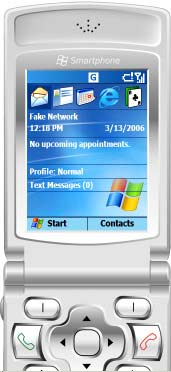
1. Press the [Start] button (Picture1).
2. Select '1 Messaging' option (Picture2).
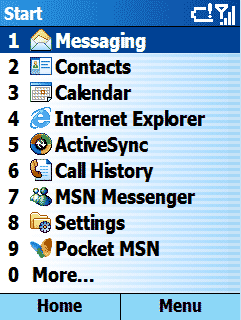
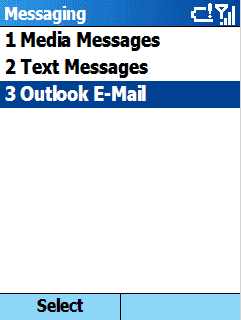
3. Select '3 Outlook E-mail' option
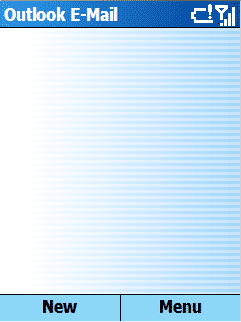
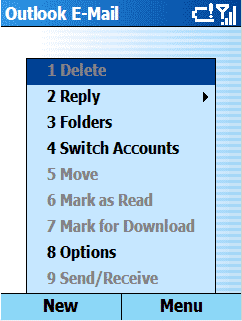
4. Select [Menu]
5. Select ' 8 Options' from the 'Menu' list
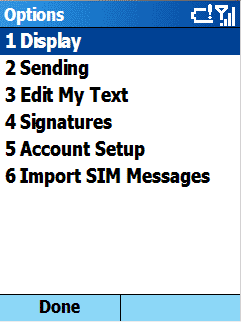
6. Select '5 Account Setup' from the 'Options' list
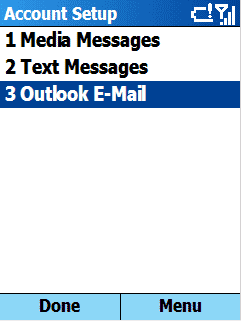
7. Select '3 Outlook Email' from the 'Account Setup' list
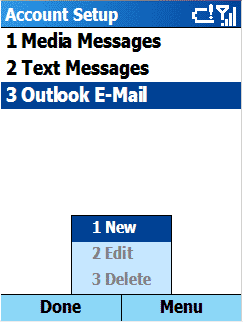
8. Select [Menu]
9. Select '1 New' option from the 'Menu' list
10. Enter your name in the 'Your name' field;
enter your e-mail address in the 'Email Address' field, select [Next] option.
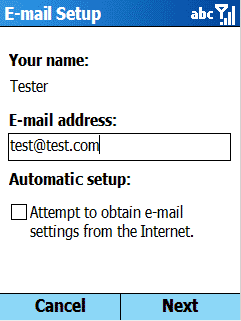
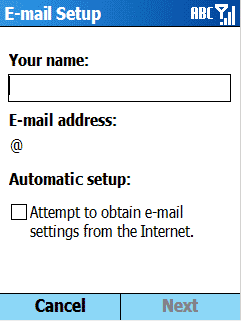
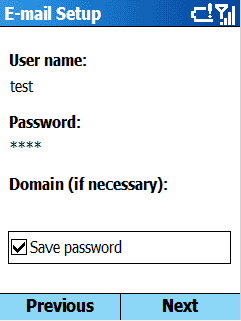
11. Enter your POP3 user name in the 'User Name:' field,
move the cursor below, enter your POP3
account password in the 'Password:' field ,
select whether to save the password or not, and press [Next]
Note: In most cases, the POP3 user name and password are not equal to
the SMTP User Name and SMTP Password.
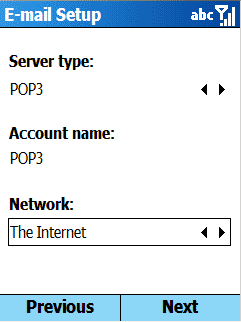
12. Select 'POP3' as the 'Server type:', move the cursor below,
enter the 'Account name' you want to be displayed in the list of SmartPhone accounts,
move the cursor below and select the type of 'Network' connection from the list of available options (The Internet, MMS Network, Secure WAP Network, WAP Network, Work, etc…).
Make sure that this connection is properly configured in the SmartPhone settings and is available for use, otherwise your e-mail messaging will fail.
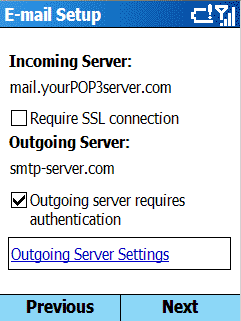
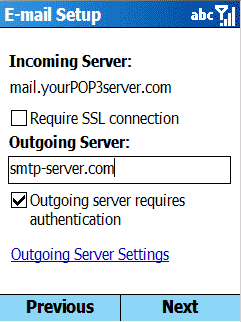
13. Enter your POP3 server name in the ''Incoming Server' field, move the cursor
below and type smtp-server.com in the 'Outgoing Server' field. Check the box 'Outgoing
Server requires authentication'.
14. Select 'Outgoing Server Settings'
For COX in the US here are the POP3 and SMTP server based on your location
POP SERVER FOR COX
In the Incoming mail server (POP3) box and the Outgoing mail server (SMTP) box, type the server names that apply to your geographic location.
East State CT, FL, GA, LA, NC, OH, RI, VA
pop.east.cox.net smtp.east.cox.net
Central State AR, ID, KS, MI, NE, OK, TX, UT
pop.central.cox.net smtp.central.cox.net
West State AZ, CA, NV
pop.west.cox.net smtp.west.cox.net
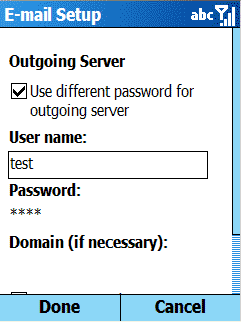
15. If your POP3 account and SMTP accounts have different passwords, check the box ''Use different password for outgoing server'.
16. Move the cursor below and enter your SMTP User Name in the 'User name' field. Move the cursor below and enter your SMTP Password in the 'Password' field.
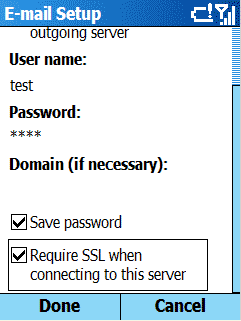
17. Scroll down the screen; check the 'Save Password' and 'Require SSL
when connecting to this server' options. This setting is highly recommended.
It makes your entire email session, including your login, encrypted and secure.
Select [Done] to complete the setup.
18. Select [Next] to configure other e-mail options.
19. Configure other e-mail options and select [Next]
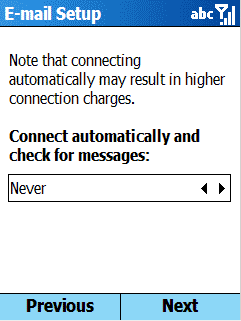
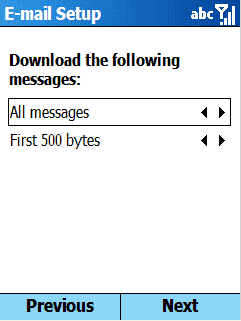
20. Select [Finish] to complete a new e-mail account configuration
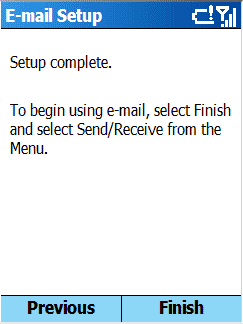
Congratulations! You’ve just completed your POP3 and Secure SMTP account configuration. Now you are ready to send/receive e-mail messages, select 'Send/Receive' from the 'Menu' options to begin using e-mail.
Create an account. You'll then receive details that you'll need to set up your account on your Smartphone. Then, looking at the Smartphone, follow these instructions:
This will work with the motorola Q for example
1. Press the [Start] button (Picture1).
2. Select '1 Messaging' option (Picture2).

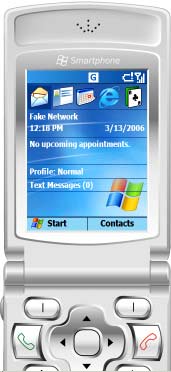
3. Select '3 Outlook E-mail' option

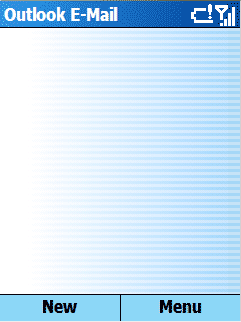
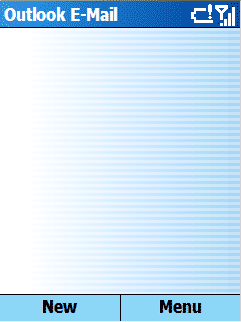
4. Select [Menu]
5. Select ' 8 Options' from the 'Menu' list
6. Select '5 Account Setup' from the 'Options' list
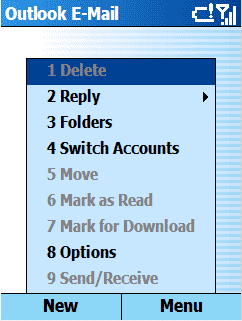

7. Select '3 Outlook Email' from the 'Account Setup' list
8. Select [Menu]
9. Select '1 New' option from the 'Menu' list

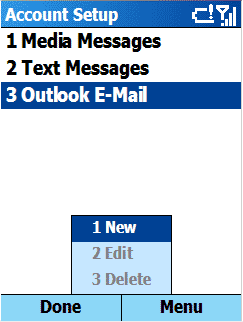
10. Enter your name in the 'Your name' field;
enter your e-mail address in the 'Email Address' field, select [Next] option.


11. Enter your POP3 user name in the 'User Name:' field,
move the cursor below, enter your POP3
account password in the 'Password:' field ,
select whether to save the password or not, and press [Next]
Note: In most cases, the POP3 user name and password are not equal to
the SMTP User Name and SMTP Password.
12. Select 'POP3' as the 'Server type:', move the cursor below,
enter the 'Account name' you want to be displayed in the list of SmartPhone accounts,
move the cursor below and select the type of 'Network' connection from the list of available options (The Internet, MMS Network, Secure WAP Network, WAP Network, Work, etc…).
Make sure that this connection is properly configured in the SmartPhone settings and is available for use, otherwise your e-mail messaging will fail.


13. Enter your POP3 server name in the ''Incoming Server' field, move the cursor
below and type smtp-server.com in the 'Outgoing Server' field. Check the box 'Outgoing
Server requires authentication'.
14. Select 'Outgoing Server Settings'
For COX in the US here are the POP3 and SMTP server based on your location
POP SERVER FOR COX
In the Incoming mail server (POP3) box and the Outgoing mail server (SMTP) box, type the server names that apply to your geographic location.
East State CT, FL, GA, LA, NC, OH, RI, VA
pop.east.cox.net smtp.east.cox.net
Central State AR, ID, KS, MI, NE, OK, TX, UT
pop.central.cox.net smtp.central.cox.net
West State AZ, CA, NV
pop.west.cox.net smtp.west.cox.net
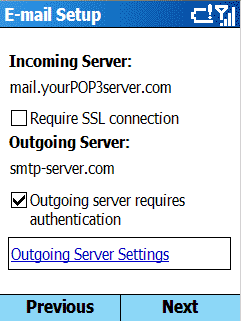

15. If your POP3 account and SMTP accounts have different passwords, check the box ''Use different password for outgoing server'.
16. Move the cursor below and enter your SMTP User Name in the 'User name' field. Move the cursor below and enter your SMTP Password in the 'Password' field.
17. Scroll down the screen; check the 'Save Password' and 'Require SSL
when connecting to this server' options. This setting is highly recommended.
It makes your entire email session, including your login, encrypted and secure.
Select [Done] to complete the setup.

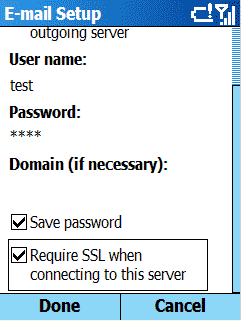
18. Select [Next] to configure other e-mail options.
19. Configure other e-mail options and select [Next]
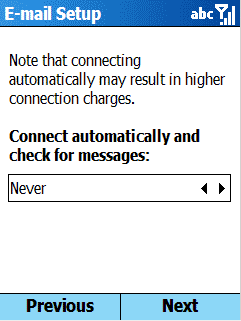
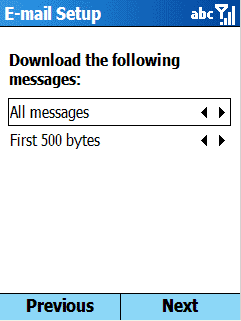
20. Select [Finish] to complete a new e-mail account configuration
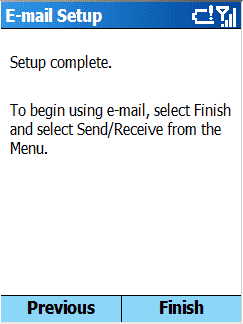
Congratulations! You’ve just completed your POP3 and Secure SMTP account configuration. Now you are ready to send/receive e-mail messages, select 'Send/Receive' from the 'Menu' options to begin using e-mail.
Tuesday, July 11, 2006
My Windows Vista Beta 2 User Experience
What i like
What i don't like
- Search function is nicely integrated in the OS now. Much better than the old search in file Dialog
- File Explorer uses some kind of NextStep functionnality which is great.
- No more Active Sync
- Look and Feel is better
What i don't like
- The windows Paint application still doesn't support Auto Scroll when doing a crop of an image beeing past from a screen shot obviously bigger than the working screen size.
- When i plug some USB devices other than a Smartphone or PDA with a card reader, the color of the icon should change weither the removable storage drive does contain some files or not (empty/full)
to be continued...
Motorola Q and SlingMedia
If you have ever dream of streaming media from your TV to your Q and remote control
your TIVO from your Q when you are out. Check out this video. Sweeeeet
http://www.youtube.com/watch?v=2qCCyGxX5Gk
your TIVO from your Q when you are out. Check out this video. Sweeeeet
http://www.youtube.com/watch?v=2qCCyGxX5Gk
Monday, July 10, 2006
SoundMax Audio Driver Problems on Windows Vista Beta 2
SoundMax Audio Driver Problems
If you are using the onboard Audio card of a Intel Motherboard, then you need to install the SoundMax Audio drivers from Analog Devices. The problem is that the setup kit of the driver checks the windows version and exits with a message that the OS is not supported. There are also some reports of problems with the driver if you go and install via the inf file.
The problem is to get your hands on the lastest drivers. The easiest way was to download it off the Dell support site. Search for "Audio: Analog Devices ADI 198x Integrated Audio, Driver, Windows 2000, Windows XP, Multi Language, Multi System" and download the latest update you can find.
Just have Vista check for new drivers. (Right click on it in the Device Manager, Update Driver Software, Search automatically for updated driver software) Worked for me.
If you are using the onboard Audio card of a Intel Motherboard, then you need to install the SoundMax Audio drivers from Analog Devices. The problem is that the setup kit of the driver checks the windows version and exits with a message that the OS is not supported. There are also some reports of problems with the driver if you go and install via the inf file.
The problem is to get your hands on the lastest drivers. The easiest way was to download it off the Dell support site. Search for "Audio: Analog Devices ADI 198x Integrated Audio, Driver, Windows 2000, Windows XP, Multi Language, Multi System" and download the latest update you can find.
Just have Vista check for new drivers. (Right click on it in the Device Manager, Update Driver Software, Search automatically for updated driver software) Worked for me.
Thursday, July 06, 2006
Treemap
Treemap is a space-constrained visualization of hierarchical structures. It is very effective in showing attributes of leaf nodes using size and color coding. Treemap enables users to compare nodes and sub-trees even at varying depth in the tree, and help them spot patterns and exceptions.Treemap was first designed by Ben Shneiderman during the 1990s. For more information, read the historical summary of treemaps, their growing set of applications, and the many other implementations. Treemaps are a continuing topic of research and application at the HCIL. For more information visit http://www.cs.umd.edu/hcil/treemap/
A very great sample of what you can achieve with tree map
Browse Google News available at the following URL http://www.marumushi.com/apps/newsmap/newsmap.cfm
A very great sample of what you can achieve with tree map
Browse Google News available at the following URL http://www.marumushi.com/apps/newsmap/newsmap.cfm
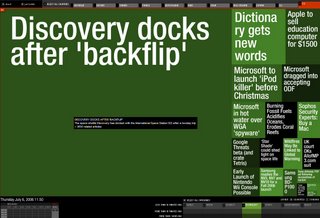
Hard Drive Browsing
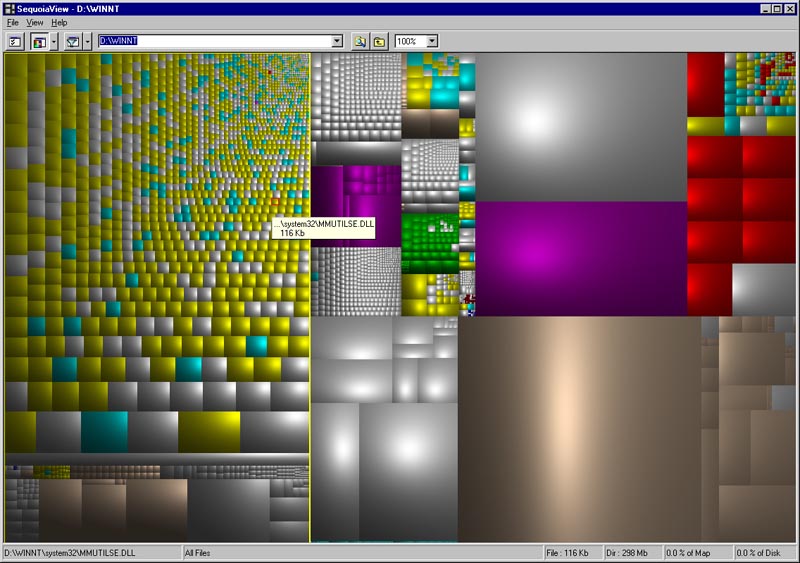
have you ever wanted to delete some files unused from a long time on your harddrive or see right away which use file are taking lots of space on you harddrive. Sometimes this file are deep into a folder hierarchy. Using the build in feature on Windows XP give really really poor features. like cleaning the Temp folder. Watch out this product with a bit of realtime optimization this product will be AWESOME.
Friday, January 27, 2006
Changing the dialog bitmap of an MSI setup.exe
Recently i face one problem within the Installshield Developer 10.5 suite from Macrovision.
For MSI project, there is no way to specify the Cool Bitmap that you want to be displayed during the decompression stage when running a self extract setup.exe file.
At this stage the self extract installer decompress the MSI file, optionnaly copy this file in the Windows Installer Cache folder. The left banner image is the default one provide by Macrovision and in many cases this graph is ugly and didn't match the logo of your product or company.
The easyest way is to use existing Resource Editor. The smallest and best one so far is
ResHacker available here http://angusj.com/resourcehacker/
1 Run it and select the setup.exe which is the self extract msi generated by Install shield
2 select GIF -> IDR_GIF1 -> 1033
3 Right click and choose replace resource
4 open file with new resource
5 select installshield\dist\Bitmap\MyNewBitmap.gif with the exact correct size
6 Change Field
resource type:GIF
Resource name:IDR_GIF1
Resource Language:1033
7 Click on Replace
8 Go to File and Save
Enjoy
that's all folks !
For MSI project, there is no way to specify the Cool Bitmap that you want to be displayed during the decompression stage when running a self extract setup.exe file.
At this stage the self extract installer decompress the MSI file, optionnaly copy this file in the Windows Installer Cache folder. The left banner image is the default one provide by Macrovision and in many cases this graph is ugly and didn't match the logo of your product or company.
The easyest way is to use existing Resource Editor. The smallest and best one so far is
ResHacker available here http://angusj.com/resourcehacker/
1 Run it and select the setup.exe which is the self extract msi generated by Install shield
2 select GIF -> IDR_GIF1 -> 1033
3 Right click and choose replace resource
4 open file with new resource
5 select installshield\dist\Bitmap\MyNewBitmap.gif with the exact correct size
6 Change Field
resource type:GIF
Resource name:IDR_GIF1
Resource Language:1033
7 Click on Replace
8 Go to File and Save
Enjoy
that's all folks !
Using Event to Intercept Message across process
the CF is paired down due to memory constraints, and a lot of functionality was lopped off because a workaround was typically available. But when dealing with multithreaded code, waiting with a timeout is a fundamental operation.
There is a great class to let you FireEvent between different process and trap them within a c# application. Visit Trey Brain blog at http://bytemellc.com/dotText/trey/category/6.aspx He write his own, properly functioning ManualResetEvent. As describe by MSDN the required api functions: CreateEvent ( creates the event ), SetEvent ( sets the event to signaled ), ResetEvent ( resets the event back to unsignaled ), WaitForSingleObject ( waits for an event to become signaled, with the ability to return after a timeout period ), and CloseHandle ( kills the event ).
Unfortunately it is not possible to wait for multiple object using win32 p/invoke so the cient applciation will have to create a listener thread for each event and use waitforsingle object.
So this class that he wrote provide some p/invoke code, and it worked fine on any Windows Mobile 5 phone running compact framework 2. Autoreset event didn't work properly. After some research ( dumpbin of the exports for coredll.dll ), it turns out that coredll.dll does not export the SetEvent, ResetEvent, or PulseEvent api's. Rather there's a new function called EventModify that takes an event handle, and an operation flag ( Set, Reset, or Pulse ). So he modified the code to use the EventModify api instead of the Set and Reset macros.
And it works great. By doing this you can set event across process. The only issue to follow would be to use WaitForMultiple Object within one thread on the listener C# client instead of using one thread per event.
--
Thomas
There is a great class to let you FireEvent between different process and trap them within a c# application. Visit Trey Brain blog at http://bytemellc.com/dotText/trey/category/6.aspx He write his own, properly functioning ManualResetEvent. As describe by MSDN the required api functions: CreateEvent ( creates the event ), SetEvent ( sets the event to signaled ), ResetEvent ( resets the event back to unsignaled ), WaitForSingleObject ( waits for an event to become signaled, with the ability to return after a timeout period ), and CloseHandle ( kills the event ).
Unfortunately it is not possible to wait for multiple object using win32 p/invoke so the cient applciation will have to create a listener thread for each event and use waitforsingle object.
So this class that he wrote provide some p/invoke code, and it worked fine on any Windows Mobile 5 phone running compact framework 2. Autoreset event didn't work properly. After some research ( dumpbin of the exports for coredll.dll ), it turns out that coredll.dll does not export the SetEvent, ResetEvent, or PulseEvent api's. Rather there's a new function called EventModify that takes an event handle, and an operation flag ( Set, Reset, or Pulse ). So he modified the code to use the EventModify api instead of the Set and Reset macros.
And it works great. By doing this you can set event across process. The only issue to follow would be to use WaitForMultiple Object within one thread on the listener C# client instead of using one thread per event.
--
Thomas
Subscribe to:
Posts (Atom)