1 Install SQLite Database Browser in your Applications Folders
Click here to download
2 Install iPhone Backup Extractor
Click here for download
3 Download iTunes 11.0.4.4
4 backup your phone with iTunes
5 Launch iPhone Backup Extractor
5.1 Select Expert mode
5.2 For Shazam
5.2.1 Check the file com.shazam.Shazam/Documents/ShazamDataModel.sqlite
5.2.2 Choose File/Export, choose Export only checked file(s) ShazamDataModel.sqlite
5.2.3 Save the ShazamDataModel.sqlite file
5.2.4 Open the file with SQLite Database Browser and export the list to your favorites format
5.3 For lock Screen
5.3.1 The wallpaper is actually stored under the Springboard folder in the "Library". So, extract the file called HomeBackground.cpbitmap
or LockBackground.cpbitmap
5.3.2 Open your browser at http://cpbitmap.cleverbyte.com.au/
5.3.3 Select the output format PNG or JPG (loosy compression)
5.3.4 Upload the cpbitmap and enjoy your converted file
5.3.5 Scale the image to fit new iPhone 5 screen size using Photoshop/Gimp
5.3.6 Send the new file to your new iPhone 5 and update the lock screen
Note:You can also build the CPBitmap yourself using Visual Studio 2010 but you might have to change the code from time to time
if any changes to the cpbitmap has occured. The source code of the project is available here
Monday, June 17, 2013


Monday, June 03, 2013
Getting Public Key Token of Assembly Within Visual Studio
This is a very common Assembly.Load failure exception text. The terminology, this is called Ref-Def-Mismatch. This exception is thrown when your project finds an assembly that does not match what you
are looking for. A very common mismatch is version number. An example is, you asks for version 1.0.0.0, but version 2.0.0.0 is found. (keep in mind that for simply named assemblies, version
number is ignored. So we are really talking about strongly named assemblies here.)
The only time this exception will be thrown is when the mismatched assembly is in your appbase. Visual Studio will probe GAC first. If the assembly is not found in GAC, then it will probe your
appbase. If an assembly is found that matches the simple name, but has mismatch on other part of the assembly name, this exception will be thrown. Say you call
Assembly.Load(”MyAsm,Version=1.0.0.0,Culture=Neutral,PublicKeyToken=0123456789abcdef”, and VisualStudio finds MyAsm.dll in your appbase, but its version is 2.0.0.0, an exception will be thrown at
compilation time.
Regarding binding design decision.
Another interesting observation on this is for dependencies of LoadFrom assemblies. For dependencies of LoadFrom assemblies, we will probe the appbase, then the parent assembly's directory. If a
mismatch assembly is found in appbase, it does not mean a matching assembly won't be found in parent assembly's directory.
To solve this you can force specific version using Strongly named assembly. You must sign the assembly during the build step then reference your project with an assembly already build
in the target folder and then you can edit the project and force a specific assembly version using the PublicKeyToken attribute.
To generate the PublicKeyToken
In Visual Studio, go to the Tools menu and choose External Tools.
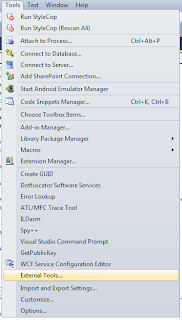
That brings up a new dialog window.
Click the Add button and add the following:
Title: Get &PublicKeyToken
Command: C:\Program Files\Microsoft SDKs\Windows\v8.0A\bin\NETFX 4.0 Tools\sn.exe
Arguments: -Tp $(TargetPath)
Check the Use Output Window checkbox. The final looks like this:
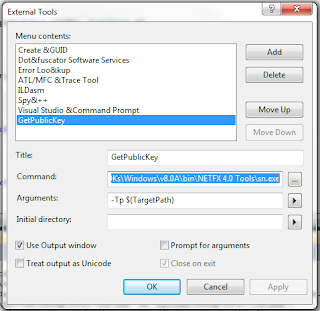
Create a project and sign it using a strong name key. Then choose Tools / Get PublicKeyToken, and in the output window you will see something like the following:
Microsoft (R) .NET Framework Strong Name Utility Version 3.5.21022.8
Copyright (c) Microsoft Corporation. All rights reserved.
Public key is
0024000004800000940000000602000000240000525341310004000001000100d59451ff2ed310
447372c4d689f24dcece5aaaef6dddaffc3e43c36a9235586b33ec9e3121ad844ee521bd76fbc0
9a9a357bfeec32d87d8cd1278cd7697667263724e6ff1712e5ee3054542cfbb11b9241da118fbd
c1df7439ba13db77b63f8bf557c7f081946c02e32884c82806e0e95667e879d15b9a2912012398
76e0efa7
Public key token is 9589fa1be527eb6c
You can use the Public Key to force the dependency with a specific assembly.
This is useful for design time assembly or to differentiate assembly limited
in feature with full featured assembly
are looking for. A very common mismatch is version number. An example is, you asks for version 1.0.0.0, but version 2.0.0.0 is found. (keep in mind that for simply named assemblies, version
number is ignored. So we are really talking about strongly named assemblies here.)
The only time this exception will be thrown is when the mismatched assembly is in your appbase. Visual Studio will probe GAC first. If the assembly is not found in GAC, then it will probe your
appbase. If an assembly is found that matches the simple name, but has mismatch on other part of the assembly name, this exception will be thrown. Say you call
Assembly.Load(”MyAsm,Version=1.0.0.0,Culture=Neutral,PublicKeyToken=0123456789abcdef”, and VisualStudio finds MyAsm.dll in your appbase, but its version is 2.0.0.0, an exception will be thrown at
compilation time.
Regarding binding design decision.
Another interesting observation on this is for dependencies of LoadFrom assemblies. For dependencies of LoadFrom assemblies, we will probe the appbase, then the parent assembly's directory. If a
mismatch assembly is found in appbase, it does not mean a matching assembly won't be found in parent assembly's directory.
To solve this you can force specific version using Strongly named assembly. You must sign the assembly during the build step then reference your project with an assembly already build
in the target folder and then you can edit the project and force a specific assembly version using the PublicKeyToken attribute.
To generate the PublicKeyToken
In Visual Studio, go to the Tools menu and choose External Tools.

That brings up a new dialog window.
Click the Add button and add the following:
Title: Get &PublicKeyToken
Command: C:\Program Files\Microsoft SDKs\Windows\v8.0A\bin\NETFX 4.0 Tools\sn.exe
Arguments: -Tp $(TargetPath)
Check the Use Output Window checkbox. The final looks like this:

Create a project and sign it using a strong name key. Then choose Tools / Get PublicKeyToken, and in the output window you will see something like the following:
Microsoft (R) .NET Framework Strong Name Utility Version 3.5.21022.8
Copyright (c) Microsoft Corporation. All rights reserved.
Public key is
0024000004800000940000000602000000240000525341310004000001000100d59451ff2ed310
447372c4d689f24dcece5aaaef6dddaffc3e43c36a9235586b33ec9e3121ad844ee521bd76fbc0
9a9a357bfeec32d87d8cd1278cd7697667263724e6ff1712e5ee3054542cfbb11b9241da118fbd
c1df7439ba13db77b63f8bf557c7f081946c02e32884c82806e0e95667e879d15b9a2912012398
76e0efa7
Public key token is 9589fa1be527eb6c
You can use the Public Key to force the dependency with a specific assembly.
This is useful for design time assembly or to differentiate assembly limited
in feature with full featured assembly
Wednesday, May 01, 2013
Older developer are better than young developer :)
http://www.wired.com/wiredenterprise/2013/04/developers-age/
Older software programmers have long complained of age discrimination. But according to study conducted by researchers at North Carolina State University, companies should think twice before hiring a young hot-shot hacker over a seasoned developer.
Emerson Murphy-Hill, an assistant professor of computer science at North Carolina State University and co-author of the study, says that veteran developers have more going for them than you might think. “We know certain things get worse, like your eye sight,” he says. “But it’s not all bad. You get better at some things, such as social and emotional intelligence.”
He says that we tend to think of programming as something that’s only practiced by the young: you spend your 20s working 80 hours a week, and then you give it up and go into management. But that may not be the best way to play it.
To determine whether programmers get better or worse with age, the researchers looked at the top ranked programmers on StackOverflow, a site where coders can ask and answer questions about programming. Users rate answers from fellow developers, and then the site uses those rating to generate a reputation score for each developer. Comparing these reputation scores to the age of each developer, the researchers found that these ratings tended to increase as developers moved into their 50s.
The study also they tried to rate the breadth of each developer’s knowledge by tracking how many different subjects they had written about. The researchers found that younger developers replied to questions in a smaller number of subject areas, and that the range of subjects broadened as developers got older.
Finally, the study looked at how many questions developers answered about technologies less than 10 years old, and it found that older developers were more knowledgable than younger users about newer mobile platforms such as iOS and Windows Phone. For other technologies, there were was no significant gap between younger and older users.
The researchers concluded that any bias against older developers is unsupported by the data on StackOverflow. But the study has its limits. Many StackOverflow users don’t report their age, and it appears that older programmers are under represented on StackOverflow, based on data from the Bureau of Labor Statistics.
Older programmers who use the site may making a conscious effort to keep their technologies skills current and to promote themselves. Or they may use the site because they know they are knowledgeable, while their less knowledgeable peers may stay off the site, skewing the results. And, of course, StackOverflow reputation scores don’t necessarily correlate to programming skills.
The paper detailing the study, Is Programming Knowledge Related To Age?, will be presented at the Working Conference on Mining Software Repositories in San Francisco on May 18. But it’s just a start. In an effort to draw better conclusions, Murphy-Hill says his team hopes to look at a wider variety of programmer populations. He says they’re also interested in finding out why younger developers contribute more to open source than older developers.
Wednesday, March 27, 2013
Nokia 920 vs Samsung Galaxy SIII picture quality
Very cool photo comparison tool
Welcome to the GSMArena Photo Compare Tool. The tool puts up to three phones and their cameras head to head, testing their performance on three charts.
The overview picture on the left shows each chart through the "eyes" of the phone and the windows on the right show a part of the photo zoomed at 100%. You can drag the green viewfinder (or just click on the overview) to pan around the chart.
http://www.gsmarena.com/piccmp.php3?idType=3&idPhone1=4967&idPhone2=4968&idPhone3=4238
Thursday, March 14, 2013
How can I pad an int32 or int64 with leading zeros replacement of sprintf
#define hexchar(x) ((((x)&0x0F)>9)?((x)+'A'-10):((x)+'0'))
typedef signed long long Int64;
// special printf for numbers only
// see formatting information below
// Print the number "n" in the given "base"
// using exactly "numDigits"
// print +/- if signed flag "isSigned" is TRUE
// use the character specified in "padchar" to pad extra characters
//
// Examples:
// sprintfNum(pszBuffer, 6, 10, 6, TRUE, ' ', 1234); --> " +1234"
// sprintfNum(pszBuffer, 6, 10, 6, FALSE, '0', 1234); --> "001234"
// sprintfNum(pszBuffer, 6, 16, 6, FALSE, '.', 0x5AA5); --> "..5AA5"
void sprintfNum(char *pszBuffer, int size, char base, char numDigits, char isSigned, char padchar, Int64 n)
{
char *ptr = pszBuffer;
if (!pszBuffer)
{
return;
}
char *p, buf[32];
unsigned long long x;
unsigned char count;
// prepare negative number
if( isSigned && (n < 0) )
{
x = -n;
}
else
{
x = n;
}
// setup little string buffer
count = (numDigits-1)-(isSigned?1:0);
p = buf + sizeof (buf);
*--p = '\0';
// force calculation of first digit
// (to prevent zero from not printing at all!!!)
*--p = (char)hexchar(x%base);
x = x / base;
// calculate remaining digits
while(count--)
{
if(x != 0)
{
// calculate next digit
*--p = (char)hexchar(x%base);
x /= base;
}
else
{
// no more digits left, pad out to desired length
*--p = padchar;
}
}
// apply signed notation if requested
if( isSigned )
{
if(n < 0)
{
*--p = '-';
}
else if(n > 0)
{
*--p = '+';
}
else
{
*--p = ' ';
}
}
// print the string right-justified
count = numDigits;
while(count--)
{
*ptr++ = *p++;
}
return;
}
typedef signed long long Int64;
// special printf for numbers only
// see formatting information below
// Print the number "n" in the given "base"
// using exactly "numDigits"
// print +/- if signed flag "isSigned" is TRUE
// use the character specified in "padchar" to pad extra characters
//
// Examples:
// sprintfNum(pszBuffer, 6, 10, 6, TRUE, ' ', 1234); --> " +1234"
// sprintfNum(pszBuffer, 6, 10, 6, FALSE, '0', 1234); --> "001234"
// sprintfNum(pszBuffer, 6, 16, 6, FALSE, '.', 0x5AA5); --> "..5AA5"
void sprintfNum(char *pszBuffer, int size, char base, char numDigits, char isSigned, char padchar, Int64 n)
{
char *ptr = pszBuffer;
if (!pszBuffer)
{
return;
}
char *p, buf[32];
unsigned long long x;
unsigned char count;
// prepare negative number
if( isSigned && (n < 0) )
{
x = -n;
}
else
{
x = n;
}
// setup little string buffer
count = (numDigits-1)-(isSigned?1:0);
p = buf + sizeof (buf);
*--p = '\0';
// force calculation of first digit
// (to prevent zero from not printing at all!!!)
*--p = (char)hexchar(x%base);
x = x / base;
// calculate remaining digits
while(count--)
{
if(x != 0)
{
// calculate next digit
*--p = (char)hexchar(x%base);
x /= base;
}
else
{
// no more digits left, pad out to desired length
*--p = padchar;
}
}
// apply signed notation if requested
if( isSigned )
{
if(n < 0)
{
*--p = '-';
}
else if(n > 0)
{
*--p = '+';
}
else
{
*--p = ' ';
}
}
// print the string right-justified
count = numDigits;
while(count--)
{
*ptr++ = *p++;
}
return;
}
Monday, March 11, 2013
ERROR LEVEL
Errorlevels
The correct name for errorlevels would be return codes.
But since the DOS command to determine the return code is IF ERRORLEVEL, most people use the name errorlevel.
Errorlevels are not a standard feature of every command.
A certain errorlevel may mean anything the programmer wanted it to.
Most programmers agree that an errorlevel 0 means the command executed successfully, and an errorlevel 1 or higher usually spells trouble.
But there are many exceptions to this general rule.
IF ERRORLEVEL construction has one strange feature, that can be used to our advantage: it returns TRUE if the return code was equal to or higher than the specified errorlevel.
This means most of the time we only need to check IF ERRORLEVEL 1 ... and this will return TRUE for every non-zero return code.
In Windows NT 4/2000/XP this may sometimes fail, since some executables return negative numbers for errorlevels!
However, this can be fixed by using the following code to check for non-zero return codes:
IF %ERRORLEVEL% NEQ 0 ...
Use the code above wherever you would have used IF ERRORLEVEL 1 ... in the "past".
To determine the exact return code the previous command returned, we could use a construction like this:
@ECHO OFF
IF ERRORLEVEL 1 SET ERRORLEV=1
IF ERRORLEVEL 2 SET ERRORLEV=2
IF ERRORLEVEL 3 SET ERRORLEV=3
IF ERRORLEVEL 4 SET ERRORLEV=4
•
•
•
IF ERRORLEVEL 254 SET ERRORLEV=254
IF ERRORLEVEL 255 SET ERRORLEV=255
ECHO ERRORLEVEL = %ERRORLEV%
This is perfectly OK if we only have to check, say, 15 consecutive errorlevels.
If we need to check every errorlevel, though, there are better alternatives.
In Windows NT 4 (and 2000?) this won't work, since the SET command itself will set an errorlevel (usually 0)!
(As I learned from Charles Long, in XP the SET command no longer sets an errorlevel itself.)
However, Windows NT 4 and later make it easy by storing the latest errorlevel in the environment variable ERRORLEVEL:
ECHO.%ERRORLEVEL%
will display the errorlevel.
This blog entry by Batcheero explains perfectly why you should never SET the ERRORLEVEL variable.
The safest way to use errorlevels for all DOS versions is the reverse order check.
Start checking the highest errorlevel that can be expected, then check for the one below, etcetera:
IF ERRORLEVEL 255 GOTO Label255
IF ERRORLEVEL 254 GOTO Label254
•
•
•
IF ERRORLEVEL 2 GOTO Label2
IF ERRORLEVEL 1 GOTO Label1
GOTO Label0
:Label255
(commands to be executed at errorlevel 255)
GOTO End
•
•
•
:Label1
(commands to be executed at errorlevel 1)
GOTO End
:Label0
(commands to be executed at errorlevel 0, or no errorlevel)
:End
This will result in many more lines of batch code, but at least it will work in any DOS version.
In DOS for the rest of us, we can use FOR loops to determine the errorlevel:
@ECHO OFF
REM Reset variables
FOR %%A IN (1 10 100) DO SET ERR%%A=
REM Check error level hundredfolds
FOR %%A IN (0 1 2) DO IF ERRORLEVEL %%A00 SET ERR100=%%A
IF %ERR100%==2 GOTO 200
IF %ERR100%==0 IF NOT "%1"=="/0" SET ERR100=
REM Check error level tenfolds
FOR %%A IN (0 1 2 3 4 5 6 7 8 9) DO IF ERRORLEVEL %ERR100%%%A0 SET ERR10=%%A
IF "%ERR100%"=="" IF %ERR10%==0 SET ERR10=
:1
REM Check error level units
FOR %%A IN (0 1 2 3 4 5) DO IF ERRORLEVEL %ERR100%%ERR10%%%A SET ERR1=%%A
REM Modification necessary for errorlevels 250+
IF NOT ERRORLEVEL 250 FOR %%A IN (6 7 8 9) DO IF ERRORLEVEL %ERR100%%ERR10%%%A SET ERR1=%%A
GOTO End
:200
REM In case of error levels over 200 both
REM tenfolds and units are limited to 5
REM since the highest DOS error level is 255
FOR %%A IN (0 1 2 3 4 5) DO IF ERRORLEVEL 2%%A0 SET ERR10=%%A
IF ERR10==5 FOR %%A IN (0 1 2 3 4 5) DO IF ERRORLEVEL 25%%A SET ERR1=%%A
IF NOT ERR10==5 GOTO 1
:End
REM Clean up the mess and show results
SET ERRORLEV=%ERR100%%ERR10%%ERR1%
FOR %%A IN (1 10 100) DO SET ERR%%A=
ECHO ERRORLEVEL %ERRORLEV%
The correct name for errorlevels would be return codes.
But since the DOS command to determine the return code is IF ERRORLEVEL, most people use the name errorlevel.
Errorlevels are not a standard feature of every command.
A certain errorlevel may mean anything the programmer wanted it to.
Most programmers agree that an errorlevel 0 means the command executed successfully, and an errorlevel 1 or higher usually spells trouble.
But there are many exceptions to this general rule.
IF ERRORLEVEL construction has one strange feature, that can be used to our advantage: it returns TRUE if the return code was equal to or higher than the specified errorlevel.
This means most of the time we only need to check IF ERRORLEVEL 1 ... and this will return TRUE for every non-zero return code.
In Windows NT 4/2000/XP this may sometimes fail, since some executables return negative numbers for errorlevels!
However, this can be fixed by using the following code to check for non-zero return codes:
IF %ERRORLEVEL% NEQ 0 ...
Use the code above wherever you would have used IF ERRORLEVEL 1 ... in the "past".
To determine the exact return code the previous command returned, we could use a construction like this:
@ECHO OFF
IF ERRORLEVEL 1 SET ERRORLEV=1
IF ERRORLEVEL 2 SET ERRORLEV=2
IF ERRORLEVEL 3 SET ERRORLEV=3
IF ERRORLEVEL 4 SET ERRORLEV=4
•
•
•
IF ERRORLEVEL 254 SET ERRORLEV=254
IF ERRORLEVEL 255 SET ERRORLEV=255
ECHO ERRORLEVEL = %ERRORLEV%
This is perfectly OK if we only have to check, say, 15 consecutive errorlevels.
If we need to check every errorlevel, though, there are better alternatives.
In Windows NT 4 (and 2000?) this won't work, since the SET command itself will set an errorlevel (usually 0)!
(As I learned from Charles Long, in XP the SET command no longer sets an errorlevel itself.)
However, Windows NT 4 and later make it easy by storing the latest errorlevel in the environment variable ERRORLEVEL:
ECHO.%ERRORLEVEL%
will display the errorlevel.
This blog entry by Batcheero explains perfectly why you should never SET the ERRORLEVEL variable.
The safest way to use errorlevels for all DOS versions is the reverse order check.
Start checking the highest errorlevel that can be expected, then check for the one below, etcetera:
IF ERRORLEVEL 255 GOTO Label255
IF ERRORLEVEL 254 GOTO Label254
•
•
•
IF ERRORLEVEL 2 GOTO Label2
IF ERRORLEVEL 1 GOTO Label1
GOTO Label0
:Label255
(commands to be executed at errorlevel 255)
GOTO End
•
•
•
:Label1
(commands to be executed at errorlevel 1)
GOTO End
:Label0
(commands to be executed at errorlevel 0, or no errorlevel)
:End
This will result in many more lines of batch code, but at least it will work in any DOS version.
In DOS for the rest of us, we can use FOR loops to determine the errorlevel:
@ECHO OFF
REM Reset variables
FOR %%A IN (1 10 100) DO SET ERR%%A=
REM Check error level hundredfolds
FOR %%A IN (0 1 2) DO IF ERRORLEVEL %%A00 SET ERR100=%%A
IF %ERR100%==2 GOTO 200
IF %ERR100%==0 IF NOT "%1"=="/0" SET ERR100=
REM Check error level tenfolds
FOR %%A IN (0 1 2 3 4 5 6 7 8 9) DO IF ERRORLEVEL %ERR100%%%A0 SET ERR10=%%A
IF "%ERR100%"=="" IF %ERR10%==0 SET ERR10=
:1
REM Check error level units
FOR %%A IN (0 1 2 3 4 5) DO IF ERRORLEVEL %ERR100%%ERR10%%%A SET ERR1=%%A
REM Modification necessary for errorlevels 250+
IF NOT ERRORLEVEL 250 FOR %%A IN (6 7 8 9) DO IF ERRORLEVEL %ERR100%%ERR10%%%A SET ERR1=%%A
GOTO End
:200
REM In case of error levels over 200 both
REM tenfolds and units are limited to 5
REM since the highest DOS error level is 255
FOR %%A IN (0 1 2 3 4 5) DO IF ERRORLEVEL 2%%A0 SET ERR10=%%A
IF ERR10==5 FOR %%A IN (0 1 2 3 4 5) DO IF ERRORLEVEL 25%%A SET ERR1=%%A
IF NOT ERR10==5 GOTO 1
:End
REM Clean up the mess and show results
SET ERRORLEV=%ERR100%%ERR10%%ERR1%
FOR %%A IN (1 10 100) DO SET ERR%%A=
ECHO ERRORLEVEL %ERRORLEV%
Thursday, February 28, 2013
WIX CustomAction deferred versus immediate and the nightmare of Windows platform dotNet dependency
When it comes to using WIX everybody would agree that C# language is on the paper the easiest language to use to write a Custom Action.
When things get more complicated is that if you want to create a WIX installer for both Windows 7 and Windows8 then you need to
build each custom action to target both dotNet Framework 3.5 and dotNetFramework 4.0 unfortunately you will have to create two solution because
unlike Visual Studio C++ project the dotNet dependency applies to the entire solution and not the configuration at least this is what I noticed
on Visual Studio 2010.
You have to be very careful on when to decide that your CustomAction will be immediate and when it will be deferred.
If you use your custom action to install driver, install Windows Services, setup MYSQL ODBC connection, configure IIS or delete file from protected folder
then you need to use a deferred custom action.
While both deferred and immediate custom actions can run in the context of the user initiating the installation, only deferred custom actions can run elevated using the system context.
Deferred custom actions can only be sequenced between the InstallInitialize and InstallFinalize actions in execute sequence tables. Immediate custom actions, on the other hand, can be sequenced
anywhere within any of the sequence tables. Deferred custom actions are not executed immediately. Instead they are scheduled to run later during the execution script. The execution script isn't processed until the InstallExecute, InstallExecuteAgain, or InstallFinalize action is run.
Deferred custom actions cannot access the installation database. In fact, deferred custom actions have very limited access to the installation session because an installation script can be executed
outside of the installation session that created it. Immediate custom actions have access to the installation database and can read and set installation properties, modify feature and component
states, and add temporary columns, rows, and tables among other things.
Deferred custom actions should be used when the custom action must make a change to the system or call another system service. Additionally, only deferred custom actions can run in an elevated
context. If your custom action requires elevated privileges in order to run, your custom action needs to be marked as deferred. Custom actions marked to run in the system context
(msidbCustomActionTypeInScript + msidbCustomActionTypeNoImpersonate) will only run in the system context if the installation itself is elevated.
So let's look at how to solve the dependencencie issue first.
1 I recommend passing an argument to your WIX build script to create an MSI based on the targeted OS
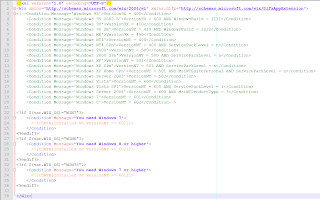
2 Dot Net Dependency
Make sure you know the build in version of dotNet on your targeted OS Win7 is 3.5 with fallback to 2.0
Windows 8 is 4.0 and deprecated support for 3.5
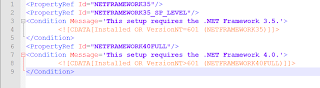
3 CustomAction deferred
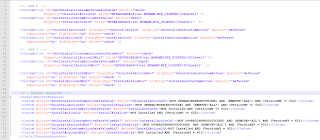
Inside your C# CustomAction you can only access property passed to you inside the Value attribute of the CustomAction
session.Message(InstallMessage.Warning,
new Record(new string[]
{
string.Format("MYVARIABLE: {0}",
session.CustomActionData["MYVARIABLE"])
}));
Direct access to the property will fail such as string UILevel = session["UILevel"];
You cannot change MSI property inside the CustomAction but you can cheat and log a dummy property if you expect to parse the installation log during a silent install
to check the response of your custom action. Rolling back custom action is not easy when you messed up with some third party application setting
so in some cases you have to return return ActionResult.Success regardless of the outcome and rely on a result code
EG
string strLog = string.Format("Property(S): ResultCode = {0}", Convert.ToString(1));
session.Log(strLog);
4 CustomAction immediate
For install custom action if your custom action rely on files deployed within your MIS to some target folder then make sure you change Before="InstallFinalize" to
After="InstallFinalize">
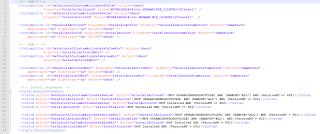
In this case you can access any property through the session object EG string UILevel = session["UILevel"]; and you can set a new property before exiting from your CustomAction
session["ResultCode"] = 1
Hope this article will help you solve Windows 7 and Windows 8 Installer issue
When things get more complicated is that if you want to create a WIX installer for both Windows 7 and Windows8 then you need to
build each custom action to target both dotNet Framework 3.5 and dotNetFramework 4.0 unfortunately you will have to create two solution because
unlike Visual Studio C++ project the dotNet dependency applies to the entire solution and not the configuration at least this is what I noticed
on Visual Studio 2010.
You have to be very careful on when to decide that your CustomAction will be immediate and when it will be deferred.
If you use your custom action to install driver, install Windows Services, setup MYSQL ODBC connection, configure IIS or delete file from protected folder
then you need to use a deferred custom action.
While both deferred and immediate custom actions can run in the context of the user initiating the installation, only deferred custom actions can run elevated using the system context.
Deferred custom actions can only be sequenced between the InstallInitialize and InstallFinalize actions in execute sequence tables. Immediate custom actions, on the other hand, can be sequenced
anywhere within any of the sequence tables. Deferred custom actions are not executed immediately. Instead they are scheduled to run later during the execution script. The execution script isn't processed until the InstallExecute, InstallExecuteAgain, or InstallFinalize action is run.
Deferred custom actions cannot access the installation database. In fact, deferred custom actions have very limited access to the installation session because an installation script can be executed
outside of the installation session that created it. Immediate custom actions have access to the installation database and can read and set installation properties, modify feature and component
states, and add temporary columns, rows, and tables among other things.
Deferred custom actions should be used when the custom action must make a change to the system or call another system service. Additionally, only deferred custom actions can run in an elevated
context. If your custom action requires elevated privileges in order to run, your custom action needs to be marked as deferred. Custom actions marked to run in the system context
(msidbCustomActionTypeInScript + msidbCustomActionTypeNoImpersonate) will only run in the system context if the installation itself is elevated.
So let's look at how to solve the dependencencie issue first.
1 I recommend passing an argument to your WIX build script to create an MSI based on the targeted OS

2 Dot Net Dependency
Make sure you know the build in version of dotNet on your targeted OS Win7 is 3.5 with fallback to 2.0
Windows 8 is 4.0 and deprecated support for 3.5

3 CustomAction deferred

Inside your C# CustomAction you can only access property passed to you inside the Value attribute of the CustomAction
session.Message(InstallMessage.Warning,
new Record(new string[]
{
string.Format("MYVARIABLE: {0}",
session.CustomActionData["MYVARIABLE"])
}));
Direct access to the property will fail such as string UILevel = session["UILevel"];
You cannot change MSI property inside the CustomAction but you can cheat and log a dummy property if you expect to parse the installation log during a silent install
to check the response of your custom action. Rolling back custom action is not easy when you messed up with some third party application setting
so in some cases you have to return return ActionResult.Success regardless of the outcome and rely on a result code
EG
string strLog = string.Format("Property(S): ResultCode = {0}", Convert.ToString(1));
session.Log(strLog);
4 CustomAction immediate
For install custom action if your custom action rely on files deployed within your MIS to some target folder then make sure you change Before="InstallFinalize" to
After="InstallFinalize">

In this case you can access any property through the session object EG string UILevel = session["UILevel"]; and you can set a new property before exiting from your CustomAction
session["ResultCode"] = 1
Hope this article will help you solve Windows 7 and Windows 8 Installer issue
Monday, February 18, 2013
Friday, February 15, 2013
Very interesting article about Adobe Photoshop source code version 1
pho·to·shop, transitive verb, often capitalized \ˈfō-(ˌ)tō-ˌshäp\
1.to alter (a digital image) with Photoshop software or other image-editing software especially in a way that distorts reality (as for deliberately deceptive purposes)
– Merriam-Webster online dictionary, 2012
http://computerhistory.org/atchm/adobe-photoshop-source-code/
Thursday, February 14, 2013
Fast way to shrink VMWARE image
I am sure everyone noticed that when using a repository inside the VM the size of the VM on disk
keeps growing even when you delete branches or get rid of old Android repo like 2.3 and focus on the good
stuff Android 4.2 and work against the fragmentation of Google Android Platform where migration is key :)
To get more disk space, the key is to compact the VM once in a while.
The slow way
Normal commands for Linux VM are
1. Inside of VM-- $ sudo vmware-tools
a. Select “shrink” tab
b. Select “/” folder
c. Hit “shrink” button and enjoy the process
d. Repeat the same for “/boot” folder and for any other folders you might have there
2. Shutdown VM completely
3. From VMware menu find “Settings->Hardware->Hard Disk->Utilities->Defragment”
4. From VMware menu find “Settings->Hardware->Hard Disk->Utilities->Compact”
Now the fast way :
For Linux VM
In the VM, in a Terminal make sure you become root (sudo bash) and then copy and paste the following command, as is,
and then press Enter:
dd if=/dev/zero of=wipefile bs=1024x1024; rm wipefile
Wait for the command prompt to return and then shutdown the VM and then from the Virtual Machine Settings for the
Hard Disk select the Compact command from the Utilities button.
You’ll be able to spare a couple of Gigabyte !!
We are talking at least of a 2X gain easy.. I didn't benchmark yet because I am impatient to use the fast way only!
On Windows
Assuming the VMware virtual disk is not pre-allocated and the Filesystem is ext4 you will have to
manually prepare it to be shrunk. When Windows deletes a file, it doesn’t actually delete the data on the disk,
it just deletes the references/pointers in the file allocation tables. So when “shrink” is processing a vmdk and
is looking at the raw disk, it is seeing values that aren’t empty (non-zero) and export them as such.
So before doing a Shrink, use a really cool command line tool developed by Mark Russinovich SDelete.
Simply execute SDelete with parameter –c inside running Virtual Machine, then shut down the Guest
and do a Shrink
keeps growing even when you delete branches or get rid of old Android repo like 2.3 and focus on the good
stuff Android 4.2 and work against the fragmentation of Google Android Platform where migration is key :)
To get more disk space, the key is to compact the VM once in a while.
The slow way
Normal commands for Linux VM are
1. Inside of VM-- $ sudo vmware-tools
a. Select “shrink” tab
b. Select “/” folder
c. Hit “shrink” button and enjoy the process
d. Repeat the same for “/boot” folder and for any other folders you might have there
2. Shutdown VM completely
3. From VMware menu find “Settings->Hardware->Hard Disk->Utilities->Defragment”
4. From VMware menu find “Settings->Hardware->Hard Disk->Utilities->Compact”
Now the fast way :
For Linux VM
In the VM, in a Terminal make sure you become root (sudo bash) and then copy and paste the following command, as is,
and then press Enter:
dd if=/dev/zero of=wipefile bs=1024x1024; rm wipefile
Wait for the command prompt to return and then shutdown the VM and then from the Virtual Machine Settings for the
Hard Disk select the Compact command from the Utilities button.
You’ll be able to spare a couple of Gigabyte !!
We are talking at least of a 2X gain easy.. I didn't benchmark yet because I am impatient to use the fast way only!
On Windows
Assuming the VMware virtual disk is not pre-allocated and the Filesystem is ext4 you will have to
manually prepare it to be shrunk. When Windows deletes a file, it doesn’t actually delete the data on the disk,
it just deletes the references/pointers in the file allocation tables. So when “shrink” is processing a vmdk and
is looking at the raw disk, it is seeing values that aren’t empty (non-zero) and export them as such.
So before doing a Shrink, use a really cool command line tool developed by Mark Russinovich SDelete.
Simply execute SDelete with parameter –c inside running Virtual Machine, then shut down the Guest
and do a Shrink
Wednesday, February 13, 2013
Installing Microsoft Update Standalone Packages Silently
MSU file extention are used to install Microsoft KB Hot Fixes. This process usually
display a dialog box similar to the Windows Update install dialog when installing
and at the end sometimes a reboot is needed.
As they use the same switches as the existing Microsoft updates,
installing them silently is very straightforward.
They are processed by a command named WUSA.EXE (Windows Update Standalone Installer),
so a command-line would look like this:
START /WAIT WUSA Windows6.0-KBNNNNNN-x86.msu /QUIET /NORESTART
Where 6.0 is the OS version
or
START /WAIT Windows6.0-KBNNNNNN-x86.msu /QUIET /NORESTART
You can run the WUSA command with /? to see a dialog box detailing the complete
help text:
wusa
wusa [/quiet] [/norestart]
/?, /h, /help – Display help information.
update – Full path of the MSU file.
/quiet – Quiet mode, no user interaction. reboot as needed
/norestart – When combined with /quiet, installer will NOT initiate reboot.
It is ignored if it is used alone
The following PowrShell Script will push a HOT FIX to a list of SERVERS
$Servers = $(1..176 | foreach {"SERVER$_"})
$HotfixPath = '\\Fileserver\Hotfixes\KB2464876\Windows6.0-KB2464876-x86.msu'
foreach ($Server in $Servers){
if (Test-Path "\\$Server\c$\Temp"){
Write-Host "Processing $Server..."
# Copy update package to local folder on server
Copy-Item $Hotfixpath "\\$Server\c$\Temp"
# Run command as SYSTEM via PsExec (-s switch)
& E:\SysinternalsSuite\PsExec -s \\$Server wusa C:\Temp\Windows6.0-KB2464876-x86.msu /quiet /norestart
if ($LastExitCode -eq 3010) {
$ConfirmReboot = $False
} else {
$ConfirmReboot = $True
}
# Delete local copy of update package
Remove-Item "\\$Server\c$\Temp\Windows6.0-KB2464876-x86.msu"
Write-Host "Restarting $Server..."
Restart-Computer -ComputerName $Server -Force -Confirm:$ConfirmReboot
Write-Host
} else {
Write-Host "Folder C:\Temp does not exist on the target server"
}
}
display a dialog box similar to the Windows Update install dialog when installing
and at the end sometimes a reboot is needed.
As they use the same switches as the existing Microsoft updates,
installing them silently is very straightforward.
They are processed by a command named WUSA.EXE (Windows Update Standalone Installer),
so a command-line would look like this:
START /WAIT WUSA Windows6.0-KBNNNNNN-x86.msu /QUIET /NORESTART
Where 6.0 is the OS version
or
START /WAIT Windows6.0-KBNNNNNN-x86.msu /QUIET /NORESTART
You can run the WUSA command with /? to see a dialog box detailing the complete
help text:
wusa
wusa
/?, /h, /help – Display help information.
update – Full path of the MSU file.
/quiet – Quiet mode, no user interaction. reboot as needed
/norestart – When combined with /quiet, installer will NOT initiate reboot.
It is ignored if it is used alone
The following PowrShell Script will push a HOT FIX to a list of SERVERS
$Servers = $(1..176 | foreach {"SERVER$_"})
$HotfixPath = '\\Fileserver\Hotfixes\KB2464876\Windows6.0-KB2464876-x86.msu'
foreach ($Server in $Servers){
if (Test-Path "\\$Server\c$\Temp"){
Write-Host "Processing $Server..."
# Copy update package to local folder on server
Copy-Item $Hotfixpath "\\$Server\c$\Temp"
# Run command as SYSTEM via PsExec (-s switch)
& E:\SysinternalsSuite\PsExec -s \\$Server wusa C:\Temp\Windows6.0-KB2464876-x86.msu /quiet /norestart
if ($LastExitCode -eq 3010) {
$ConfirmReboot = $False
} else {
$ConfirmReboot = $True
}
# Delete local copy of update package
Remove-Item "\\$Server\c$\Temp\Windows6.0-KB2464876-x86.msu"
Write-Host "Restarting $Server..."
Restart-Computer -ComputerName $Server -Force -Confirm:$ConfirmReboot
Write-Host
} else {
Write-Host "Folder C:\Temp does not exist on the target server"
}
}
Tuesday, February 12, 2013
Which operating systems come with .net ?
.NET Framework 1.1: Windows Server 2003
.NET Framework 2.0: Windows Server 2003 R2
.NET Framework 3.0: Windows Vista, Windows Server 2008
.NET Framework 3.5 SP1: Windows 7, Windows Server 2008 R2
.NET Framework 4.0: Windows 8
.NET Framework 4.5: Windows 8
.NET Compact Framework 1.0 (SP2): Windows Mobile 5.0
.NET Compact Framework 2.0: Windows Mobile 6.0
Mono 1.1.13.6: Ubuntu Dapper (6.06 LTS)
Mono 1.2.6: Ubuntu Hardy (8.04 LTS)
Mono 2.4.2.3: Ubuntu Karmic (9.10)
Mono 2.4 branch snapshot: Ubuntu Lucid (10.04 LTS)
Mono 2.6.7: Ubuntu Maverick (10.10), Ubuntu Natty (11.04)
Saturday, January 26, 2013
Lens correction for GoPro HD 3 Silver Edition using DXO Optics Pro 7 and greater
This tutorial explain how to flattened an image taken by the GoPro HD 3 using DXO Optics Pro.
DXO Optics pro is the best software out there to provide lens correction.
Unfortunately DXO Labs didn't release yet and official Correction Module for GoPro HD 3 Silver Edition
Nether the less you can still use fish eye correction in a few click to correct your image.
I will be using the following image taken in panoramic mode

Step 1 Load the image inside DXO Optics Pro

Step 2 let's take a closer look at the image properties
Menu Image --> Image properties

Step 3 on the right en size menu under the corrections group

Select the combo box Correction to Manual
Select the combo box Distortion type to Fish Eye
Finally move the intensity slider to + 67
Et voila!

Note that the result is not perfect and that some objects might still look a bit stretched
more particularly, the objects on the first plan but for outdoor shots this is not
that bad at all!
Now DXO Labs and GoPro folks, let's provide a lens module for DXO. Many are looking forward to it!
DXO Optics pro is the best software out there to provide lens correction.
Unfortunately DXO Labs didn't release yet and official Correction Module for GoPro HD 3 Silver Edition
Nether the less you can still use fish eye correction in a few click to correct your image.
I will be using the following image taken in panoramic mode

Step 1 Load the image inside DXO Optics Pro

Step 2 let's take a closer look at the image properties
Menu Image --> Image properties

Step 3 on the right en size menu under the corrections group

Select the combo box Correction to Manual
Select the combo box Distortion type to Fish Eye
Finally move the intensity slider to + 67
Et voila!

Note that the result is not perfect and that some objects might still look a bit stretched
more particularly, the objects on the first plan but for outdoor shots this is not
that bad at all!
Now DXO Labs and GoPro folks, let's provide a lens module for DXO. Many are looking forward to it!
Thursday, January 24, 2013
Finding Apache configuration file (httpd.conf) location and access log
Finding Apache configuration file (httpd.conf) location
Just a quick tip for programmers/administrator working with Apache or accessing a remote Linux server with putty.
Sometimes you need to backup or extract access_log or find the location of access_log so that you can generate HTML report using visitors http://shop.actimus.com/product_info.php?products_id=125
Since it's possible to configure apache from the source code there is no "default location" so I usually do:
$ ps -ef | grep apache
www 3085 12945 0 22:08 ? 00:00:00 /usr/local/apache2/bin/httpd
www 3323 12945 0 22:09 ? 00:00:00 /usr/local/apache2/bin/httpd
www 5253 12945 0 22:18 ? 00:00:00 /usr/local/apache2/bin/httpd
www 5256 12945 0 11:29 ? 00:00:02 /usr/local/apache2/bin/httpd
www 5270 12945 0 11:29 ? 00:00:02 /usr/local/apache2/bin/httpd
www 8062 12945 0 22:32 ? 00:00:00 /usr/local/apache2/bin/httpd
www 8685 12945 0 22:36 ? 00:00:00 /usr/local/apache2/bin/httpd
www 8820 12945 0 22:36 ? 00:00:00 /usr/local/apache2/bin/httpd
www 10294 12945 0 22:42 ? 00:00:00 /usr/local/apache2/bin/httpd
www 11097 12945 0 22:46 ? 00:00:00 /usr/local/apache2/bin/httpd
root 12498 9316 0 22:53 pts/0 00:00:00 grep --color=auto apache
root 12945 1 0 Jan13 ? 00:00:14 /usr/local/apache2/bin/httpd
Then simply run
$ /usr/local/apache2/bin/httpd -V
Server version: Apache/2.2.23 (Unix)
Server built: Jan 11 2013 16:12:42
....
Server compiled with....
-D SERVER_CONFIG_FILE="conf/httpd.conf"
conf folder is a sub folder of
/usr/local/apache2/
Then you can edit httpd.conf
and look for access log location
access_log
error_log
etc..
Some would say that you can use the following but it is not guarantee that this is
attached to the running instance
$ find / -name httpd.conf
Now you can generate a report
visitors /var/log/apache/access.log.*
or
zcat access.log.*.gz | visitors -
Enjoy!
Just a quick tip for programmers/administrator working with Apache or accessing a remote Linux server with putty.
Sometimes you need to backup or extract access_log or find the location of access_log so that you can generate HTML report using visitors http://shop.actimus.com/product_info.php?products_id=125
Since it's possible to configure apache from the source code there is no "default location" so I usually do:
$ ps -ef | grep apache
www 3085 12945 0 22:08 ? 00:00:00 /usr/local/apache2/bin/httpd
www 3323 12945 0 22:09 ? 00:00:00 /usr/local/apache2/bin/httpd
www 5253 12945 0 22:18 ? 00:00:00 /usr/local/apache2/bin/httpd
www 5256 12945 0 11:29 ? 00:00:02 /usr/local/apache2/bin/httpd
www 5270 12945 0 11:29 ? 00:00:02 /usr/local/apache2/bin/httpd
www 8062 12945 0 22:32 ? 00:00:00 /usr/local/apache2/bin/httpd
www 8685 12945 0 22:36 ? 00:00:00 /usr/local/apache2/bin/httpd
www 8820 12945 0 22:36 ? 00:00:00 /usr/local/apache2/bin/httpd
www 10294 12945 0 22:42 ? 00:00:00 /usr/local/apache2/bin/httpd
www 11097 12945 0 22:46 ? 00:00:00 /usr/local/apache2/bin/httpd
root 12498 9316 0 22:53 pts/0 00:00:00 grep --color=auto apache
root 12945 1 0 Jan13 ? 00:00:14 /usr/local/apache2/bin/httpd
Then simply run
$ /usr/local/apache2/bin/httpd -V
Server version: Apache/2.2.23 (Unix)
Server built: Jan 11 2013 16:12:42
....
Server compiled with....
-D SERVER_CONFIG_FILE="conf/httpd.conf"
conf folder is a sub folder of
/usr/local/apache2/
Then you can edit httpd.conf
and look for access log location
access_log
error_log
etc..
Some would say that you can use the following but it is not guarantee that this is
attached to the running instance
$ find / -name httpd.conf
Now you can generate a report
visitors /var/log/apache/access.log.*
or
zcat access.log.*.gz | visitors -
Enjoy!
Tuesday, January 22, 2013
Visitors apache log analyzer TXT and HTML output
Visitors is a very fast web log analyzer for Linux, Windows, and other Unix-like
operating systems. It takes as input a web server log file, and outputs
statistics in form of different reports. The design principles are very different compared to other software of the same type:
No installation required, can process up to 150,000 lines of log entries per second
in fast computers (20MB/s with my log files average length).
Designed to be executed by the command line, output html and text reports. The text
report can be used in pipe to less to check web stats from ssh.
Support for real time statistics with the Visitors Stream Mode introduced with
version 0.3.
To specify the log format is not needed at all. Works out of box with apache and most
other web servers with a standard log format (see the documentation for more
information on the format).
It's a portable C program, can be compiled on many different systems. Binaries for
Windows systems are in the Download section of this page.
The produced html report doesn't contain images or external CSS, is self-contained,
you can send it by email to users.
Visitors is free software (and of course, freeware), under the terms of the GPL
license. You don't need to pay to use it. Visitors is supported, if you want a
custom version made directly by the original author for a modest price, contact
me at antirez (at) invece (dot) org. ISPs may take advantage of the high
processing speed.
Graph generation combined with Graphviz
Using the graphviz mode Visitors will process the web log files and output a graph
ready to be rendered using Graphviz. The generated graph is the visual equivalent
of web trials, but is much more interesting for complex sites, so the focus of
this feature is not to create a generic graph of the whole site, but a graph of
the usage patterns that shows how the users are using it. Click on the image to
see the graph for www.hping.org, or read how to generate it in the on line
documentation.
Examples
The simplest usage, to be used interactively when you have a web log to check (for
example over ssh in your web server), just type:
visitors access.log | less
that will produce an human readable output in text only. To generate html web stats
with much more information you may use instead this:
visitors -A -m 30 access.log -o html > report.html
If you want information on the usage patterns for your site you must provide the url
prefix of your web site, and specify the --trails option.
visitors -A -m 30 access.log -o html --trails --prefix http://www.hping.org > report.html
Note that's ok to specify multiple file names, or to provide the input using the
standard input like in the following two examples:
visitors /var/log/apache/access.log.*
zcat access.log.*.gz | visitors -
Check the documentation for more information on how to use it.
Statistics generated with VISITORS version 0.7
http://www.hping.org/visitors for more information
=== General information ===
--- Information about analyzed log files
--- Generated: Fri Mar 31 12:53:09 2006
* Number of entries processed: 39472
* Number of invalid entries: 0
* Processing time in seconds: 3
=== Generated reports ===
--- Click on the report name you want to see
* Number of reports generated: 27
-> Unique visitors in each day
-> Unique visitors in each month
-> Unique visitors from Google in each day
-> Unique visitors from Google in each month
-> Pageviews per visit
-> Weekday-Hour combined map
-> Month-Day combined map
-> Requested pages
-> Requested images and CSS
-> Referers
-> Referers by first time
-> Robots and web spiders
-> User agents
-> Operating Systems
-> Browsers
-> 404 Errors
-> Domains
-> Googled pages
-> Adsensed pages
-> Google Keyphrases
-> Google Keyphrases by first time
-> Google Human Language
-> Screen resolution
-> Screen color depth
-> Web trails
-> Weekday distribution
-> Hours distribution
=== Unique visitors in each day ===
--- Multiple hits with the same IP, user agent and access day, are considered a
single visit
* Number of unique visitors: 7583
* Different days in logfile: 6
26/Mar/2006 : 794 |################ 10.5%
27/Mar/2006 : 1271 |########################### 16.8%
28/Mar/2006 : 1441 |############################## 19.0%
29/Mar/2006 : 2062 |############################################ 27.2%
30/Mar/2006 : 1417 |############################## 18.7%
31/Mar/2006 : 598 |############ 7.9%
=== Unique visitors in each month ===
--- Multiple hits with the same IP, user agent and access day, are considered a
single visit
* Number of unique visitors: 7583
* Different months in logfile: 1
Mar/2006 : 7583 |############################################ 100.0%
=== Unique visitors from Google in each day ===
--- The red part of the bar expresses the percentage of visits originated from Google
* Number of unique visitors: 7583
* Number of unique visitors from google: 1428
* Different days in logfile: 6
26/Mar/2006: 147 |########.................................... 18.5%
27/Mar/2006: 249 |########.................................... 19.6%
28/Mar/2006: 333 |##########.................................. 23.1%
29/Mar/2006: 316 |######...................................... 15.3%
30/Mar/2006: 272 |########.................................... 19.2%
31/Mar/2006: 111 |########.................................... 18.6%
=== Unique visitors from Google in each month ===
--- The red part of the bar expresses the percentage of visits originated from Google
* Number of unique visitors: 7583
* Number of unique visitors from google: 1428
* Different months in logfile: 1
Mar/2006: 1428 |########.................................... 18.8%
=== Weekday-Hour combined map ===
--- Brighter means higher level of hits
* Hour with max traffic starting at We 12:00 with hits: 253
* Hour with min traffic starting at Fr 13:00 with hits: 0
Mo: . .... ..
Tu: . . ......... ...
We: .. . #+-.-.......
Th: . . ....... ....
Fr: ..
Sa:
Su: .
000000000011111111112222
012345678901234567890123
=== Month-Day combined map ===
--- Brighter means higher level of hits
* Day with max traffic is Mar 29 with hits: 2156
* Day with min traffic is Mar 31 with hits: 674
Jan:
Feb:
Mar: .--#-.
Apr:
May:
Jun:
Jul:
Aug:
Sep:
Oct:
Nov:
Dec:
0000000001111111111222222222233
1234567890123456789012345678901
=== Pageviews per visit ===
--- Number of pages requested per visit
* Only documents are counted (not images). Reported ranges:: 13
1 : 3090 |############################################ 62.4%
2 : 1045 |############## 21.1%
3 : 391 |##### 7.9%
4 : 164 |## 3.3%
5 : 92 |# 1.9%
6 : 55 | 1.1%
11-20 : 43 | 0.9%
7 : 22 | 0.4%
8 : 17 | 0.3%
21-30 : 9 | 0.2%
9 : 8 | 0.2%
10 : 7 | 0.1%
> 30 : 5 | 0.1%
=== Requested pages ===
--- Page requests ordered by hits
* Different pages requested: 197
1) /: 4280
2) /robots.txt: 1272
=== Requested images and CSS ===
--- Images and CSS requests ordered by hits
* Different images and CSS requested: 55
1) /favicon.ico: 4850
=== Referers ===
--- Referers ordered by visits (google excluded)
* Different referers: 752
=== Referers by first time ===
--- Referers ordered by first time date, newer on top (referers from google excluded)
* Different referers: 750
=== Robots and web spiders ===
--- Agents requesting robots.txt. MSIECrawler excluded.
* Total number of different robots: 67
1) Mozilla/5.0 (compatible; Yahoo! Slurp;
http://help.yahoo.com/help/us/ysearch/slurp): 26
2) msnbot/1.0 (+http://search.msn.com/msnbot.htm): 14
3) Mozilla/5.0 (compatible; Yahoo! Slurp China;
http://misc.yahoo.com.cn/help.html): 13
4) Mozilla/2.0 (compatible; Ask Jeeves/Teoma;
+http://sp.ask.com/docs/about/tech_crawling.html): 9
5) Mozilla/5.0 (Windows; U; Windows NT 5.1; en-US; rv:1.8.0.1) Gecko/20060111
Firefox/1.5.0.1: 8 6) NutchCVS/0.7.1 (Nutch; http://lucene.apache.org/nutch/bot.html; nutch-
agent@lucene.apache.org): 7 7) psbot/0.1 (+http://www.picsearch.com/bot.html): 5
8) msnbot/0.9 (+http://search.msn.com/msnbot.htm): 5
9) Mozilla/5.0 (compatible; BecomeBot/2.3; MSIE 6.0 compatible;
+http://www.become.com/site_owners.html): 5
10) larbin_2.6.3 (larbin2.6.3@unspecified.mail): 5
11) NutchCVS/0.8-dev (Nutch running at UW; http://www.nutch.org/docs/en/bot.html; sycrawl@cs.washington.edu): 4
12) Mozilla/5.0 (X11; U; Linux x86_64; en-US; rv:1.7.10) Gecko/20050724
Firefox/1.0.6: 4
13) -: 4
14) NaverBot-1.0 (NHN Corp. / +82-31-784-1989 /
nhnbot@naver.com): 4 15) Mozilla/5.0 (compatible; Googlebot/2.1; +http://www.google.com/bot.html): 3
16) MJ12bot/v1.0.7 (http://majestic12.co.uk/bot.php?+): 3
17) Mozilla/4.0 (compatible; MSIE 5.0; Windows 95) VoilaBot BETA 1.2
(http://www.voila.com/): 2
18) Mozilla/4.0: 2
19) CSCrawler -> http://www.kde.cs.uni-kassel.de/lehre/ss2005/googlespam/crawler.html RPT-HTTPClient/0.3-3: 2
20) Mozilla/5.0 (Windows; U; Windows NT 5.1; ja; rv:1.8.0.1) Gecko/20060111
Firefox/1.5.0.1: 2
=== User agents ===
--- The entire user agent string ordered by visits
* Different agents: 1507
=== Operating Systems ===
--- Operating Systems by visits
* Different operating systems listed: 8
Windows : 5436 |############################################ 67.1%
Unknown : 1348 |########## 16.6%
Linux : 1001 |######## 12.4%
Macintosh : 244 |# 3.0%
FreeBSD : 37 | 0.5%
NetBSD : 12 | 0.1%
SunOS : 11 | 0.1%
OpenBSD : 8 | 0.1%
=== Browsers ===
--- Browsers used by visits
* Different browsers listed: 22
Firefox : 3178 |############################################ 39.2%
Explorer 6.x: 2664 |#################################### 32.9%
Unknown : 699 |######### 8.6%
Opera : 249 |### 3.1%
GoogleBot : 215 |## 2.7%
Other Mozilla based: 193 |## 2.4%
MSNbot : 181 |## 2.2%
Wget : 138 |# 1.7%
Safari : 133 |# 1.6%
Explorer 5.x: 122 |# 1.5%
Yahoo Slurp : 110 |# 1.4%
Konqueror : 74 |# 0.9%
Explorer unknown version: 60 | 0.7%
Lynx : 30 | 0.4%
ZyBorg : 9 | 0.1%
Ask Jeeves : 9 | 0.1%
Galeon : 9 | 0.1%
Links : 8 | 0.1%
NATSU-MICAN : 5 | 0.1%
W3M : 5 | 0.1%
Explorer 4.x: 3 | 0.0%
MultiZilla : 3 | 0.0%
=== 404 Errors ===
--- Requests for missing documents
* Different missing documents requested: 122
=== Domains ===
--- Top Level Domains sorted by visits
* Total number of Top Level Domains: 1
numeric IP : 8097 |############################################ 100.0%
=== Googled pages ===
--- Pages accessed by the Google crawler, last access reported
* Number of pages googled: 53
=== Adsensed pages ===
--- Pages accessed by the Adsense crawler, last access reported
* Number of pages adsensed: 22
=== Google Keyphrases ===
--- Keyphrases used in google searches ordered by visits
* Total number of keyphrases: 589
=== Google Keyphrases by first time ===
--- Keyphrases ordered by first time date, newer on top
* Different referers: 589
=== Google Human Language ===
--- The 'hl' field in the query string of google searches
* Different human languages: 34
1) en: 570
2) es: 98
3) de: 81
4) fr: 75
5) it: 65
6) ja: 37
7) pl: 34
8) zh: 27
9) pt: 24
10) nl: 23
11) ca: 14
12) tr: 10
13) sv: 10
14) vi: 8
15) ru: 7
16) no: 7
17) hu: 6
18) da: 6
19) ro: 6
20) fi: 5
21) cs: 5
22) th: 5
23) ko: 4
24) is: 3
25) id: 3
26) el: 3
27) bg: 2
28) sl: 2
29) sk: 2
30) bn: 1
31) tl: 1
32) ar: 1
33) lv: 1
34) lt: 1
=== Screen resolution ===
--- user screen width x height resolution
* Different resolutions: 25
1) 1024x768: 477
2) 1280x1024: 430
3) 1400x1050: 80
4) 1152x864: 56
5) 1600x1200: 55
6) 1280x800: 53
7) 1680x1050: 51
8) 800x600: 36
9) 1440x900: 33
10) 1280x768: 21
11) 1920x1200: 21
12) 1280x960: 17
13) 1280x854: 16
14) 2560x1024: 6
15) 3200x1200: 5
16) 1152x768: 3
17) 1024x1280: 3
18) 2800x1050: 2
19) 1240x1024: 2
20) 2680x1050: 2
21) 1440x960: 1
22) 1152x870: 1
23) 1600x1024: 1
24) 3840x1024: 1
25) 1280x973: 1
=== Screen color depth ===
--- user screen color depth in bits per pixel
* Different color depths: 4
1) 32: 999
2) 24: 216
3) 16: 154
4) 8: 5
=== Web trails ===
--- Referer -> Target common moves
* Total number of trails: 461
=== Weekdays distribution ===
--- Percentage of hits in every day of the week
Mo : 1377 |############################ 17.0%
Tu : 1511 |############################## 18.7%
We : 2156 |############################################ 26.6%
Th : 1484 |############################## 18.3%
Fr : 674 |############# 8.3%
Sa : 0 | 0.0%
Su : 895 |################## 11.1%
=== Hours distribution ===
--- Percentage of hits in every hour of the day
00 : 381 |########################### 4.7%
01 : 298 |##################### 3.7%
02 : 216 |############### 2.7%
03 : 259 |################## 3.2%
04 : 252 |################## 3.1%
05 : 204 |############## 2.5%
06 : 220 |############### 2.7%
07 : 216 |############### 2.7%
08 : 265 |################### 3.3%
09 : 318 |###################### 3.9%
10 : 289 |#################### 3.6%
11 : 340 |######################## 4.2%
12 : 611 |############################################ 7.5%
13 : 458 |################################ 5.7%
14 : 393 |############################ 4.9%
15 : 391 |############################ 4.8%
16 : 451 |################################ 5.6%
17 : 383 |########################### 4.7%
18 : 414 |############################# 5.1%
19 : 340 |######################## 4.2%
20 : 340 |######################## 4.2%
21 : 325 |####################### 4.0%
22 : 416 |############################# 5.1%
23 : 317 |###################### 3.9%
operating systems. It takes as input a web server log file, and outputs
statistics in form of different reports. The design principles are very different compared to other software of the same type:
No installation required, can process up to 150,000 lines of log entries per second
in fast computers (20MB/s with my log files average length).
Designed to be executed by the command line, output html and text reports. The text
report can be used in pipe to less to check web stats from ssh.
Support for real time statistics with the Visitors Stream Mode introduced with
version 0.3.
To specify the log format is not needed at all. Works out of box with apache and most
other web servers with a standard log format (see the documentation for more
information on the format).
It's a portable C program, can be compiled on many different systems. Binaries for
Windows systems are in the Download section of this page.
The produced html report doesn't contain images or external CSS, is self-contained,
you can send it by email to users.
Visitors is free software (and of course, freeware), under the terms of the GPL
license. You don't need to pay to use it. Visitors is supported, if you want a
custom version made directly by the original author for a modest price, contact
me at antirez (at) invece (dot) org. ISPs may take advantage of the high
processing speed.
Graph generation combined with Graphviz
Using the graphviz mode Visitors will process the web log files and output a graph
ready to be rendered using Graphviz. The generated graph is the visual equivalent
of web trials, but is much more interesting for complex sites, so the focus of
this feature is not to create a generic graph of the whole site, but a graph of
the usage patterns that shows how the users are using it. Click on the image to
see the graph for www.hping.org, or read how to generate it in the on line
documentation.
Examples
The simplest usage, to be used interactively when you have a web log to check (for
example over ssh in your web server), just type:
visitors access.log | less
that will produce an human readable output in text only. To generate html web stats
with much more information you may use instead this:
visitors -A -m 30 access.log -o html > report.html
If you want information on the usage patterns for your site you must provide the url
prefix of your web site, and specify the --trails option.
visitors -A -m 30 access.log -o html --trails --prefix http://www.hping.org > report.html
Note that's ok to specify multiple file names, or to provide the input using the
standard input like in the following two examples:
visitors /var/log/apache/access.log.*
zcat access.log.*.gz | visitors -
Check the documentation for more information on how to use it.
Statistics generated with VISITORS version 0.7
http://www.hping.org/visitors for more information
=== General information ===
--- Information about analyzed log files
--- Generated: Fri Mar 31 12:53:09 2006
* Number of entries processed: 39472
* Number of invalid entries: 0
* Processing time in seconds: 3
=== Generated reports ===
--- Click on the report name you want to see
* Number of reports generated: 27
-> Unique visitors in each day
-> Unique visitors in each month
-> Unique visitors from Google in each day
-> Unique visitors from Google in each month
-> Pageviews per visit
-> Weekday-Hour combined map
-> Month-Day combined map
-> Requested pages
-> Requested images and CSS
-> Referers
-> Referers by first time
-> Robots and web spiders
-> User agents
-> Operating Systems
-> Browsers
-> 404 Errors
-> Domains
-> Googled pages
-> Adsensed pages
-> Google Keyphrases
-> Google Keyphrases by first time
-> Google Human Language
-> Screen resolution
-> Screen color depth
-> Web trails
-> Weekday distribution
-> Hours distribution
=== Unique visitors in each day ===
--- Multiple hits with the same IP, user agent and access day, are considered a
single visit
* Number of unique visitors: 7583
* Different days in logfile: 6
26/Mar/2006 : 794 |################ 10.5%
27/Mar/2006 : 1271 |########################### 16.8%
28/Mar/2006 : 1441 |############################## 19.0%
29/Mar/2006 : 2062 |############################################ 27.2%
30/Mar/2006 : 1417 |############################## 18.7%
31/Mar/2006 : 598 |############ 7.9%
=== Unique visitors in each month ===
--- Multiple hits with the same IP, user agent and access day, are considered a
single visit
* Number of unique visitors: 7583
* Different months in logfile: 1
Mar/2006 : 7583 |############################################ 100.0%
=== Unique visitors from Google in each day ===
--- The red part of the bar expresses the percentage of visits originated from Google
* Number of unique visitors: 7583
* Number of unique visitors from google: 1428
* Different days in logfile: 6
26/Mar/2006: 147 |########.................................... 18.5%
27/Mar/2006: 249 |########.................................... 19.6%
28/Mar/2006: 333 |##########.................................. 23.1%
29/Mar/2006: 316 |######...................................... 15.3%
30/Mar/2006: 272 |########.................................... 19.2%
31/Mar/2006: 111 |########.................................... 18.6%
=== Unique visitors from Google in each month ===
--- The red part of the bar expresses the percentage of visits originated from Google
* Number of unique visitors: 7583
* Number of unique visitors from google: 1428
* Different months in logfile: 1
Mar/2006: 1428 |########.................................... 18.8%
=== Weekday-Hour combined map ===
--- Brighter means higher level of hits
* Hour with max traffic starting at We 12:00 with hits: 253
* Hour with min traffic starting at Fr 13:00 with hits: 0
Mo: . .... ..
Tu: . . ......... ...
We: .. . #+-.-.......
Th: . . ....... ....
Fr: ..
Sa:
Su: .
000000000011111111112222
012345678901234567890123
=== Month-Day combined map ===
--- Brighter means higher level of hits
* Day with max traffic is Mar 29 with hits: 2156
* Day with min traffic is Mar 31 with hits: 674
Jan:
Feb:
Mar: .--#-.
Apr:
May:
Jun:
Jul:
Aug:
Sep:
Oct:
Nov:
Dec:
0000000001111111111222222222233
1234567890123456789012345678901
=== Pageviews per visit ===
--- Number of pages requested per visit
* Only documents are counted (not images). Reported ranges:: 13
1 : 3090 |############################################ 62.4%
2 : 1045 |############## 21.1%
3 : 391 |##### 7.9%
4 : 164 |## 3.3%
5 : 92 |# 1.9%
6 : 55 | 1.1%
11-20 : 43 | 0.9%
7 : 22 | 0.4%
8 : 17 | 0.3%
21-30 : 9 | 0.2%
9 : 8 | 0.2%
10 : 7 | 0.1%
> 30 : 5 | 0.1%
=== Requested pages ===
--- Page requests ordered by hits
* Different pages requested: 197
1) /: 4280
2) /robots.txt: 1272
=== Requested images and CSS ===
--- Images and CSS requests ordered by hits
* Different images and CSS requested: 55
1) /favicon.ico: 4850
=== Referers ===
--- Referers ordered by visits (google excluded)
* Different referers: 752
=== Referers by first time ===
--- Referers ordered by first time date, newer on top (referers from google excluded)
* Different referers: 750
=== Robots and web spiders ===
--- Agents requesting robots.txt. MSIECrawler excluded.
* Total number of different robots: 67
1) Mozilla/5.0 (compatible; Yahoo! Slurp;
http://help.yahoo.com/help/us/ysearch/slurp): 26
2) msnbot/1.0 (+http://search.msn.com/msnbot.htm): 14
3) Mozilla/5.0 (compatible; Yahoo! Slurp China;
http://misc.yahoo.com.cn/help.html): 13
4) Mozilla/2.0 (compatible; Ask Jeeves/Teoma;
+http://sp.ask.com/docs/about/tech_crawling.html): 9
5) Mozilla/5.0 (Windows; U; Windows NT 5.1; en-US; rv:1.8.0.1) Gecko/20060111
Firefox/1.5.0.1: 8 6) NutchCVS/0.7.1 (Nutch; http://lucene.apache.org/nutch/bot.html; nutch-
agent@lucene.apache.org): 7 7) psbot/0.1 (+http://www.picsearch.com/bot.html): 5
8) msnbot/0.9 (+http://search.msn.com/msnbot.htm): 5
9) Mozilla/5.0 (compatible; BecomeBot/2.3; MSIE 6.0 compatible;
+http://www.become.com/site_owners.html): 5
10) larbin_2.6.3 (larbin2.6.3@unspecified.mail): 5
11) NutchCVS/0.8-dev (Nutch running at UW; http://www.nutch.org/docs/en/bot.html; sycrawl@cs.washington.edu): 4
12) Mozilla/5.0 (X11; U; Linux x86_64; en-US; rv:1.7.10) Gecko/20050724
Firefox/1.0.6: 4
13) -: 4
14) NaverBot-1.0 (NHN Corp. / +82-31-784-1989 /
nhnbot@naver.com): 4 15) Mozilla/5.0 (compatible; Googlebot/2.1; +http://www.google.com/bot.html): 3
16) MJ12bot/v1.0.7 (http://majestic12.co.uk/bot.php?+): 3
17) Mozilla/4.0 (compatible; MSIE 5.0; Windows 95) VoilaBot BETA 1.2
(http://www.voila.com/): 2
18) Mozilla/4.0: 2
19) CSCrawler -> http://www.kde.cs.uni-kassel.de/lehre/ss2005/googlespam/crawler.html RPT-HTTPClient/0.3-3: 2
20) Mozilla/5.0 (Windows; U; Windows NT 5.1; ja; rv:1.8.0.1) Gecko/20060111
Firefox/1.5.0.1: 2
=== User agents ===
--- The entire user agent string ordered by visits
* Different agents: 1507
=== Operating Systems ===
--- Operating Systems by visits
* Different operating systems listed: 8
Windows : 5436 |############################################ 67.1%
Unknown : 1348 |########## 16.6%
Linux : 1001 |######## 12.4%
Macintosh : 244 |# 3.0%
FreeBSD : 37 | 0.5%
NetBSD : 12 | 0.1%
SunOS : 11 | 0.1%
OpenBSD : 8 | 0.1%
=== Browsers ===
--- Browsers used by visits
* Different browsers listed: 22
Firefox : 3178 |############################################ 39.2%
Explorer 6.x: 2664 |#################################### 32.9%
Unknown : 699 |######### 8.6%
Opera : 249 |### 3.1%
GoogleBot : 215 |## 2.7%
Other Mozilla based: 193 |## 2.4%
MSNbot : 181 |## 2.2%
Wget : 138 |# 1.7%
Safari : 133 |# 1.6%
Explorer 5.x: 122 |# 1.5%
Yahoo Slurp : 110 |# 1.4%
Konqueror : 74 |# 0.9%
Explorer unknown version: 60 | 0.7%
Lynx : 30 | 0.4%
ZyBorg : 9 | 0.1%
Ask Jeeves : 9 | 0.1%
Galeon : 9 | 0.1%
Links : 8 | 0.1%
NATSU-MICAN : 5 | 0.1%
W3M : 5 | 0.1%
Explorer 4.x: 3 | 0.0%
MultiZilla : 3 | 0.0%
=== 404 Errors ===
--- Requests for missing documents
* Different missing documents requested: 122
=== Domains ===
--- Top Level Domains sorted by visits
* Total number of Top Level Domains: 1
numeric IP : 8097 |############################################ 100.0%
=== Googled pages ===
--- Pages accessed by the Google crawler, last access reported
* Number of pages googled: 53
=== Adsensed pages ===
--- Pages accessed by the Adsense crawler, last access reported
* Number of pages adsensed: 22
=== Google Keyphrases ===
--- Keyphrases used in google searches ordered by visits
* Total number of keyphrases: 589
=== Google Keyphrases by first time ===
--- Keyphrases ordered by first time date, newer on top
* Different referers: 589
=== Google Human Language ===
--- The 'hl' field in the query string of google searches
* Different human languages: 34
1) en: 570
2) es: 98
3) de: 81
4) fr: 75
5) it: 65
6) ja: 37
7) pl: 34
8) zh: 27
9) pt: 24
10) nl: 23
11) ca: 14
12) tr: 10
13) sv: 10
14) vi: 8
15) ru: 7
16) no: 7
17) hu: 6
18) da: 6
19) ro: 6
20) fi: 5
21) cs: 5
22) th: 5
23) ko: 4
24) is: 3
25) id: 3
26) el: 3
27) bg: 2
28) sl: 2
29) sk: 2
30) bn: 1
31) tl: 1
32) ar: 1
33) lv: 1
34) lt: 1
=== Screen resolution ===
--- user screen width x height resolution
* Different resolutions: 25
1) 1024x768: 477
2) 1280x1024: 430
3) 1400x1050: 80
4) 1152x864: 56
5) 1600x1200: 55
6) 1280x800: 53
7) 1680x1050: 51
8) 800x600: 36
9) 1440x900: 33
10) 1280x768: 21
11) 1920x1200: 21
12) 1280x960: 17
13) 1280x854: 16
14) 2560x1024: 6
15) 3200x1200: 5
16) 1152x768: 3
17) 1024x1280: 3
18) 2800x1050: 2
19) 1240x1024: 2
20) 2680x1050: 2
21) 1440x960: 1
22) 1152x870: 1
23) 1600x1024: 1
24) 3840x1024: 1
25) 1280x973: 1
=== Screen color depth ===
--- user screen color depth in bits per pixel
* Different color depths: 4
1) 32: 999
2) 24: 216
3) 16: 154
4) 8: 5
=== Web trails ===
--- Referer -> Target common moves
* Total number of trails: 461
=== Weekdays distribution ===
--- Percentage of hits in every day of the week
Mo : 1377 |############################ 17.0%
Tu : 1511 |############################## 18.7%
We : 2156 |############################################ 26.6%
Th : 1484 |############################## 18.3%
Fr : 674 |############# 8.3%
Sa : 0 | 0.0%
Su : 895 |################## 11.1%
=== Hours distribution ===
--- Percentage of hits in every hour of the day
00 : 381 |########################### 4.7%
01 : 298 |##################### 3.7%
02 : 216 |############### 2.7%
03 : 259 |################## 3.2%
04 : 252 |################## 3.1%
05 : 204 |############## 2.5%
06 : 220 |############### 2.7%
07 : 216 |############### 2.7%
08 : 265 |################### 3.3%
09 : 318 |###################### 3.9%
10 : 289 |#################### 3.6%
11 : 340 |######################## 4.2%
12 : 611 |############################################ 7.5%
13 : 458 |################################ 5.7%
14 : 393 |############################ 4.9%
15 : 391 |############################ 4.8%
16 : 451 |################################ 5.6%
17 : 383 |########################### 4.7%
18 : 414 |############################# 5.1%
19 : 340 |######################## 4.2%
20 : 340 |######################## 4.2%
21 : 325 |####################### 4.0%
22 : 416 |############################# 5.1%
23 : 317 |###################### 3.9%
Friday, January 18, 2013
SFTP Command
Graphical SFTP clients
Two SFTP clients, CyberDuck
(for Mac OS X) and WinSCP (for Windows), are available for free download.
Graphical SFTP clients simplify file transfers by allowing you to drag and drop icons
from one window to another. Each icon represents a file or directory, and each
window represents a computer's file system. When you open the program, you specify
the name of the remote host to which you want to connect (e.g., www.mysecuredomain.com), and then authenticate with your username and password for
that host.
SPTP is very useful if you have two server in different location and you want to
migrate some data from one server to the other without downloading and then
uploading. In this case you just need to ssh to the source host then sftp to the
remote and you can then copy file from the source host to the remote host.
Command-line SFTP
You can use SFTP from the command line on Unix and Mac OS X computers. To start an
SFTP session, at the command prompt, enter:
sftp username@host
For example, if your username is bigbrother, to connect to your account on the host
iswatchingyou.com, enter:
sftp bigbrother@iswatchingyou.com
Enter your password when prompted.
Some standard commands for command-line SFTP include:
cd Change the directory on the remote computer.
chmod Change the permissions of files on the remote computer.
chown Change the owner of files on the remote computer.
exit (or quit) Close the connection to the remote computer and exit SFTP.
get Copy a file from the remote computer to the local computer.
help (or ?) Get help on the use of SFTP commands.
lcd Change the directory on the local computer.
lls List the contents of the current directory on the local computer.
lmkdir Create a directory on the local computer.
ln (or symlink) Create a symbolic link for a file on the remote computer.
lpwd Show the current directory (present working directory) on the local computer.
ls (or dir) List the contents of the current directory on the remote computer.
lumask Change the local umask value.
mkdir Create a directory on the remote computer.
put Copy a file from the local computer to the remote computer.
pwd Show the current directory (present working directory) on the remote computer.
rename Rename a file on the remote computer.
rm Delete a file on the remote computer.
rmdir Remove a directory on the remote computer (the directory usually has to be
empty).
version Display the SFTP version.
! Exit to the Unix shell prompt, where you can enter commands. To get back to SFTP,
enter exit. If you combine ! with a command (e.g., !pwd), SFTP will execute the
command without dropping you to the Unix prompt.
Two SFTP clients, CyberDuck
(for Mac OS X) and WinSCP (for Windows), are available for free download.
Graphical SFTP clients simplify file transfers by allowing you to drag and drop icons
from one window to another. Each icon represents a file or directory, and each
window represents a computer's file system. When you open the program, you specify
the name of the remote host to which you want to connect (e.g., www.mysecuredomain.com), and then authenticate with your username and password for
that host.
SPTP is very useful if you have two server in different location and you want to
migrate some data from one server to the other without downloading and then
uploading. In this case you just need to ssh to the source host then sftp to the
remote and you can then copy file from the source host to the remote host.
Command-line SFTP
You can use SFTP from the command line on Unix and Mac OS X computers. To start an
SFTP session, at the command prompt, enter:
sftp username@host
For example, if your username is bigbrother, to connect to your account on the host
iswatchingyou.com, enter:
sftp bigbrother@iswatchingyou.com
Enter your password when prompted.
Some standard commands for command-line SFTP include:
cd Change the directory on the remote computer.
chmod Change the permissions of files on the remote computer.
chown Change the owner of files on the remote computer.
exit (or quit) Close the connection to the remote computer and exit SFTP.
get Copy a file from the remote computer to the local computer.
help (or ?) Get help on the use of SFTP commands.
lcd Change the directory on the local computer.
lls List the contents of the current directory on the local computer.
lmkdir Create a directory on the local computer.
ln (or symlink) Create a symbolic link for a file on the remote computer.
lpwd Show the current directory (present working directory) on the local computer.
ls (or dir) List the contents of the current directory on the remote computer.
lumask Change the local umask value.
mkdir Create a directory on the remote computer.
put Copy a file from the local computer to the remote computer.
pwd Show the current directory (present working directory) on the remote computer.
rename Rename a file on the remote computer.
rm Delete a file on the remote computer.
rmdir Remove a directory on the remote computer (the directory usually has to be
empty).
version Display the SFTP version.
! Exit to the Unix shell prompt, where you can enter commands. To get back to SFTP,
enter exit. If you combine ! with a command (e.g., !pwd), SFTP will execute the
command without dropping you to the Unix prompt.
Thursday, January 17, 2013
Thursday, January 10, 2013
Notepad++ For Windows 8 RT ARM
That's it Windows 8 RT ARM based tablet are out there but as many already noticed Windows 8 RT is lacking a lot of useful software available on Windows x86 and Windows 64 platform.
A lack of apps has been one of the big complaints for Windows 8, particularly the RT version, which doesn't run Windows 7 apps. (Full Windows 8 PCs will run any app that works on Windows 7 mode.) No one thought this would be a permanent problem even though Microsoft failed to make its goal of 10,000 apps in the store by launch day.
The most important application is certainly a good Text Editor. Forget about Notepad or Wordpad...
So I decided to build Notepad++ for Windows 8 RT based on source code http://notepad-plus-plus.org/
You can download the 7z archive from http://shop.actimus.com/
A lack of apps has been one of the big complaints for Windows 8, particularly the RT version, which doesn't run Windows 7 apps. (Full Windows 8 PCs will run any app that works on Windows 7 mode.) No one thought this would be a permanent problem even though Microsoft failed to make its goal of 10,000 apps in the store by launch day.
The most important application is certainly a good Text Editor. Forget about Notepad or Wordpad...
So I decided to build Notepad++ for Windows 8 RT based on source code http://notepad-plus-plus.org/
You can download the 7z archive from http://shop.actimus.com/
Friday, January 04, 2013
Wednesday, December 12, 2012
tablet profit margins. Would you pick based on the margin or the manufacturing cost ?
Margin for the stock market or quality product for a life time ?
http://spectrum.ieee.org/consumer-electronics/portable-devices/tablet-profit-margins
Subscribe to:
Posts (Atom)