APE Source Filter: DirectShow audio decoder filter used to decode Monkey's Audio files (APE files)
AC3 Filter: DirectShow audio decoder and processor filter used to decode audio tracks in movies (DVD, MPEG4 and others)
AVI Splitter: Replacement for DirectShow's default Audio Video Interleave (AVI) Splitter (It can open many broken files and can reindex when needed)
CDDA Reader Filter: DirectShow audio decoder capable of reading Audio CDs
CDXA Reader Filter: DirectShow video decoder capable of reading (S)VCDs and XCDs
CoreAAC Filter: Advanced Audio Coding (AAC) DirectShow audio decoder capable of reading AAC files
CoreFlac Decoder: DirectShow audio decoder for the Flac audio codec
FFDShow: DirectShow decoding filter for decompressing DivX, XviD, H.264, FLV1, WMV, MPEG-1 and MPEG-2, MPEG-4 and various other audio and video formats. It uses libavcodec from ffmpeg project for video decompression, postprocessing code from mplayer to enhance visual quality of low bitrate movies, and is based on original DirectShow filter from XviD, which is GPL'ed educational implementation of MPEG4 encoder
FLV Splitter: Capable of splitting Flash Video files (FLV) and decoding On2 VP62 Video streams (notable users of the FLV format include YouTube, Google Video, Reuters.com, Yahoo! Video and MySpace.)
OGG Splitter: DirectShow OGG Splitter capable of splitting OGG and OGM file(s) and enables to play / create .ogm wrapped video
GPL MPEG-1/2 Decoder: DirectShow MPEG decoder filter can be used to play MPEG-1 and MPEG-2 streams
MOD Source Filter: DirectShow filter decoder capable of decoding Tracker files (MO3, IT, XM, S3M, MTM, MOD and UMX)
MPEG Splitter: DirectShow splitter capable of splitting MPEG1/MPEG2 files (MP(E)G, VOB, DAT, TS, TP, etc.)
MPV Decoder: DirectShow decoder capable of decoding MPEG1/MPEG2 Video streams, and DVDs
MPA Splitter: DirectShow Splitter capable of splitting MPEG Audio files (MP3) and MPEG4 Audio files (AAC)
MPC Source Filter: DirectShow decoder filter capable of decoding MusePack Audio files (MPC).
MP4 Splitter: DirectShow Splitter capable of splitting MP4, M4A, 3GP and HD-MOV files
Matroska Splitter: DirectShow splitter capable of splitting Matroska files (MKV and MKA)
Media Player Classic: an open source media player that looks just like Windows Media Player, but has many additional features. It has a built in DVD player with real-time zoom, support for AVI subtitles, QuickTime and RealVideo support
OFR Source Filter: DirectShow filter decoder capable of decoding OptimFROG Audio files (OFR)
RealMedia Splitter: DirectShow splitter that allows you to play RealNetworks audio/video files.
SHOUTcast Source Filter: DirectShow decoder filter capable of handling internet radio stations streams (http://www.shoutcast.com)
WV Splitter / Decoder: DirectShow WV Splitter and decoder capable of splitting and decoding WavPack Audio files (WV)
VobSub Filter: DirectShow Vob Subtitles filter capable of displaying (embedded) Subtitle files (SRT, SUB, IDX, etc)
Thursday, June 14, 2007


Friday, June 08, 2007
Manifest hell
I thought Manifests were an end to DLL hell - but it just seems that now we have manifest hell
A solution to two references to different versions of CRT, MFC, ATL in one application manifest file
I have received several questions about a case when developers find two or more references to different versions of CRT or MFC or ALT libraries in application manifest. Usually application manifest would look similar to the following:
Notice underlined version of assembly. This manifest tells Windows loader to load two different versions of the same assembly. The loader is going to do what it is told to. But the problem arises when it can only find one version (50608) of them. There are two cases when this may happen:
1) The oldest version of VC++ library is installed in WinSxS folder. For example, author of the application may have redistributed VS2005 RTM version of CRT library using MSMs or VCRedist.EXE, but ones parts of application were rebuilt with VS2005 SP1 and deployed to the same machine, SP1 versions of MSMs or VCRedist.EXE were not deployed to the same machine.
2) It is not possible to have two versions of a private assembly in one folder. For example, an author of an application has deployed the RTM version of CRT library as a private assembly in application’s local folder. After application is rebuilt with SP1, the author faces a challenge of having two copies of same files/folders in application local folder. If she keeps RTM version, Windows loader is going to complain about SP1 version missing. If she keeps SP1 version, Windows loaders is going to fail to find RTM version. Windows shows a message box which says :”The application has failed to start because of side-by-side configuration is incorrect,” and event viewer shows error details similar to “Activation context generation failed for "…\foo.exe".Error in manifest or policy file. A component version required by the application conflicts with another component version already active.” Bottom line, application does not start.
The root cause of the issue is that not all parts of application’s source code are built with the same version of VC++ libraries and tools. The linker catches some cases and reports errors when it tries to link objects and libraries built with different versions of compiler. However it is still possible to get pass the linker and an application may get these two dependencies in its manifest.
There is one solution to the problem and two workarounds.
The solution. To fix the problem, you must rebuild all parts of your code with the newest toolset and libraries. Make sure you have cleaned up all binaries built by the old toolset and started full rebuild of the whole source base. Also check that old versions of headers and import libraries for VC++ libraries are not on INCLUDE and LIB path and they are not used during the build.
If you cannot rebuild all your code and use one version of VC libraries, there are two ways to work around this problem:
Workaround#1: Install the newer version (8.0.50727.762 in this case) of VC++ MSMs or VCRedist.EXE on a machine where your application is going to run. Once policy for VC++ assemblies is installed on that machine they are going to redirect all loads of older versions (8.0.50608.0) to the newest version available on the machine.
Workaround#2: If you are redistributing VC++ libraries in application’s local folder, you need to add an application configuration file that redirects an attempt to load 8.0.50608.0 version to 8.0.50727.762 version. Configuration file has to have same name as the exe plus .config extension and has to be right next to exe or embedded into the EXE. Here is an example of a configuration file that one would use to resolve issue with the manifest from above:
inferior and superior char have been replace by { and } because google blogs text editor is retarded
{configuration}
{windows}
{assemblybinding xmlns="urn:schemas-microsoft-com:asm.v1"}
{dependentassembly}
{assemblyidentity publickeytoken="1fc8b3b9a1e18e3b" processorarchitecture="x86" name="Microsoft.VC80.CRT" type="win32"}{/assemblyidentity}
{bindingredirect newversion="8.0.50727.762" oldversion="8.0.41204.256-8.0.50727.762"}
{/dependentassembly}
{/assemblybinding}
{/windows}
{/configuration}
This file basically redirects attempts to load any version of VC CRT greater or equal to 8.0.41204.256 (VS2005 Beta 1) and less than 8.0.50727.762(VS2005 SP1) to load VS2005 SP1 version of VC CRT. It is similar to what the policy file does for a case when CRT is installed into WinSxS folder.
Overall my recommendation is to never use static libraries for which you do not have a source code. Using a static library without its source always puts a set of restrictions on build configuration of a binary that consumes it. There are ways to build a “clean” static library, but they are not well known among developers and it is very rare to find a static library that can be consumed in a code built with different versions of compiler, linker and libraries. If source code is not provided, I would only take a dependency on a DLL and only if its APIs are cleanly designed to obey rules of data exchange across DLL boundary. COM and .Net class assemblies are designed to address this problem and they are the easiest technologies to use in this scenario.
http://msdn2.microsoft.com/en-us/library/aa374182.aspx
Visual Studio 2005 SP1
http://www.microsoft.com/downloads/thankyou.aspx?familyId=bb4a75ab-e2d4-4c96-b39d-37baf6b5b1dc&displayLang=en
VCRedist x86
http://www.microsoft.com/downloads/details.aspx?familyid=32bc1bee-a3f9-4c13-9c99-220b62a191ee&displaylang=en
Visual Studio 2005 SP1
Installation fails on Windows Server 2003 editions with Windows Server 2003 SP1 Installed:
loadTOCNode(3, 'moreinformation');
The error reported is
Error 1718. File Filename was rejected by digital signature policy.This problem occurs when the computer has insufficient contiguous memory for Windows Server 2003 or Windows XP to verify that the .msi package or the .msp package is correctly signed.To resolve this issue:
•
Refer to KB article 925336 (http://support.microsoft.com/kb/925336).
VS2005 SP1 and Microsoft.VC80.CRT in applocal mode
problem running some of our applications in "applocal" mode since we have upgraded to SP1.
We use some external libraries (we don't have the source code) that were compiled with the original VS2005.
The following manifest is therefore generated:
The application runs fine when the CRT in present in WinSxS (the Policy does the correct redirection). However, if you want to use the "applocal" mode for this particular application.
When running "app.exe" if you get this message: "This application has failed to start because the application configuration is incorrect. Reinstalling the application may fix this problem.
Choose external manifest
_USE_RTM_VERSION is newly introduced in SP1 (and previously also in hotfix 919280). It is found in crtassem.h and crtdefs.h. If you use _USE_RTM_VERSION - it must be done in all EXEs and DLLs the app uses. The _USE_RTM_VERSION define determines which CRT version is placed in your manifest file. If it is defined, then the old version number is put in.
If not defined, then it puts the new version in (what ever version ends up shipping with SP1)And no, using _USE_RTM_VERSION does not avoid the runtime rebinding to the new version. The fact is, it only gives the apps the ability to use the originals, but if the new ones are there on the machine in WinSxS, then it uses the new ones instead. Without _USE_RTM_VERSION, if the originals are there and the new ones aren't, then the app doesn't even run.Without using WinSxS, even if you install applocal and if same or newer versions exist in WinSxS, then those in WinSxS will be used instead. However, there is one way to trick the system into never using the new ones from WinSxS, and only using your applocal (original) ones.
For more info see http://blog.kalmbachnet.de/?postid=80
I know of no way to force an app to use a specific version out of WinSxS, if a redirection policy has been installed.
Monday, June 04, 2007
Adobe Apollo
Apollo is the code name for a cross-operating system runtime being developed by Adobe that allows developers to leverage their existing web development skills (Flash, Flex, HTML, JavaScript, Ajax) to build and deploy rich Internet applications (RIAs) to the desktop.
Apollo enables developers to create applications that combine the benefits of web applications – network and user connectivity, rich media content, ease of development, and broad reach – with the strengths of desktop applications – application interactions, local resource access, personal settings, powerful functionality, and rich interactive experiences.
http://labs.adobe.com/technologies/apollo/
Darwing Streaming Server basics
Streaming Server Setup
Introduction
The Streaming Server comes in two flavors: Darwin Streaming Server is an Open Source project from Apple. Binaries of Darwin Streaming Server are available for Mac OS X, Red Hat Linux 9, Solaris 9 and Windows 2000/2003/XP. Apple includes QuickTime Streaming Server, a commercially supported version of the server, with Mac OS X Server. QuickTime Streaming Server adds:
QTSS Publisher, content management for streaming media.
QuickTime Broadcaster, a live encoder for live streaming from video/audio sources.
Server Admin, the graphical administration tool for managing Mac OS X Server including the Streaming Server, File Services, Web Services, Mail Services, Directory Services, etc.
QuickTime Streaming Server is formally supported by Apple, while support for the Open Source version is informally provided via mailing lists and on-line resources.
Support and Documentation
Documentation on QuickTime Streaming Server in pdf format is available here (most of the documentation applies to Darwin as well).
A QuickTime/Darwin Streaming Server technology brief in pdf format is available here. Developer documentation is available here. Apple has also posted a good summary of the use and advantages streaming versus http fast-start.
Mailing list support for Darwin Streaming Server and QuickTime Streaming Server is provided informally via the streaming server mailing lists (the users list or the developers list).
Online support resources include the QuickTime section of Apple's support site, and the Streaming Server FAQ.
Download and Install
If you are using Mac OS X Server, QuickTime Streaming Server is already installed. The procedures outlined on this page use the web administration front end for QuickTime Streaming Server. To use web administration you must enable this capability using the Server Admin application in Panther Server. Select the QuickTime Streaming Service and navigate to Access-Settings. Check off "Enable web-based administration", set the password for web administration and save your settings.
If you want to use Darwin Streaming Server, it can be downloaded here. Windows does not include Perl which is required for web administration of Darwin Streaming Server. You can download Active State Perl for Windows here. Make sure to have Perl installed before running the installer on Windows.
Once the Darwin binaries are downloaded, unpack the archive and review the Read Me file, then start the server. On Mac OS X, the server will automatically start after installation. The best way to start the server on Solaris, Linux and Windows is to start up the Perl script that provides web administration:
On Solaris and Linux: /usr/local/sbin/streamingadminserver.pl
On Windows: C:\Perl\bin\perl "C:\Program Files\Darwin Streaming Server\streamingadminserver.pl"
Note: On Windows it may be necessary to reset the administrative password before running streamingserveradmin.pl, the Perl administrative server.
You can create/reset the administrative password on Windows with the following command: C:\Perl\bin\perl "C:\Program Files\Darwin Streaming Server\WinPasswdAssistant.pl"
Once the Perl process is running you can access the web administrative interface by opening your web browser on the server and opening the URL:
http://127.0.0.1:1220
The Streaming Server can reflect live Icecast/Shoutcast broadcasts if you configure a MP3 Broadcast password.
SSL certificate. The server can be administered over SSL if a valid SSL certificate installed. Usually this feature is not enabled during installation.
Media Folder.
This is the "document root" for the streaming server. Media files will be placed in this folder or subdirectories of this folder.
Port 80 Streaming.
The server can be configured to stream over Port 80. If you are not running a web server on port 80 on the same system, it is a good idea to enable this option. This will allow clients to connect to your server through most firewalls.
Once you have navigated through the setup screens, you should see the main window for web server administration on your server. The options configured during setup can be changed in the general settings and port settings panes of the administrative web interface.
Note: You can set up the streamingserveradmin.pl to automatically execute when your server is started if you always want to have the server running (i.e. by editing rc.local on Linux). On Windows 2000/2003 Server the installer adds Darwin Streaming Server as a service in the Service Manager.
Test the Server
To test your server, go to another system on your network with QuickTime installed. Open QuickTime Player and select "Open URL..." from the File Menu:
Enter the rtsp url to your server using it's IP address and the filename sample_100kbit.mov (a sample movie installed in the Movies directory on the server):
The player should open up a stream from your server. Compressed and hinted movies can now be placed in the Movies directory and streamed.
Thursday, May 31, 2007
Microsoft Surface
Who say that apple is the best company for user interface.
Look at how microsoft is giving a lesson to apple
http://www.microsoft.com/surface/
Impressive ! Worth the virtual tour.
Seams to me be the next operating system !
Microsoft CEO Steve Ballmer showed off Surface, novel interface technology that powers a touch-screen tabletop on which you can create and manipulate images and content with gestures of your hands. The initial units will sell for between $5,000 and $10,000 each and are likely to find homes in hotels, casinos and retail stores (along with the dens of wealthy geeks). Consensus of onlookers: Pretty cool.
Wednesday, May 16, 2007
Unix Thread Versus Windows Thread
A good article for people who are trying to build efficient cross platform threading class
to be build on Linux or Windows
http://www.microsoft.com/technet/interopMigration/taskstools/migrate/unix/ucamg/ch03uav3.mspx
to be build on Linux or Windows
http://www.microsoft.com/technet/interopMigration/taskstools/migrate/unix/ucamg/ch03uav3.mspx
Tuesday, May 15, 2007
Visual Studio Project to Makefile for cross platform project
Visual Studio 6
To export a makefile
From the Project menu, select Export Makefile.
In the Export Makefile(s) dialog box, select the project(s) for which you want to create a .mak file.
A separate .mak file is created for each project you select.
If you want Visual C++ to update dependency information, check the Write dependencies when writing makefiles checkbox.
If you know that you want to automatically export the .mak file each time you update this project, use the following procedure.
To automatically export a makefile when the project is updated
1 From the Tools menu, choose Options.
2 On the Build tab, check the Export makefile when saving project file checkbox.
Selecting this option increases the time it takes to save the project.
3 To automatically write dependency information every time you export a makefile
From the Tools menu, choose Options.
4 On the Build tab, check the Always write dependencies when writing makefiles checkbox.
Selecting this option considerably increases the time it takes to write the .mak file.
5 To specify per-configuration dependency information
From the Project menu, choose Settings.
On the General tab, check the Allow per-configuration dependencies checkbox.
Selecting this option increases the time it takes to write the dependency information, according to the number of build configurations in the project.
http://msdn2.microsoft.com/en-us/library/aa233950(VS.60).aspx
Visual Studio .NET
Comvert the project to Visual Studio 6 using
stephane rodriguez prjconverter then export to makefile using Visual Studio 6
http://www.codeproject.com/tools/prjconverter.asp?df=100&forumid=10069&exp=0&select=1288997
WineMaker
The Winelib development toolkit
http://www.winehq.org/site/docs/winelib-guide/winelib-toolkit
Other
would be nice to implement a plugin for Visual Studio 2005.
I am using one to generate doxygen automatically. Merging code from winemaker
into a VS2005 plugin would be a great idea.
What about exporting the project towards those fancy building script as well
SConstruct
ANT
etc...
Monday, May 07, 2007
Using mouse and clipboard between two separate Operating Systems running on two separate boxes
Have you ever wanted to be able to cut and past text between two separate Operating System running on two diffrence box. Have you ever wanted to use one mouse on multiple Operating System.
What you are looking for is Synergy.
Synergy lets you easily share a single mouse and keyboard between multiple computers with different operating systems, each with its own display, without special hardware. It's intended for users with multiple computers on their desk since each system uses its own monitor(s).
Redirecting the mouse and keyboard is as simple as moving the mouse off the edge of your screen. Synergy also merges the clipboards of all the systems into one, allowing cut-and-paste between systems. Furthermore, it synchronizes screen savers so they all start and stop together and, if screen locking is enabled, only one screen requires a password to unlock them all. Learn more about how it works.
http://synergy2.sourceforge.net/
Tuesday, May 01, 2007
Show TIB Under The Hood From Matt Pietrek
Matt Pietrek is the author of Windows 95 System Programming Secrets (IDG Books, 1995).
http://www.microsoft.com/msj/archive/s2ce.aspx
While Windows NT™ and Windows® 95 are quite different under the hood, they both share a key system data structure that many programmers aren't aware of. To be a bit more precise, certain fields of this data structure are shared. Regardless of the differences, this structure is used extensively, and is even accessed by compiler-generated code. That's right, your C++ compiler generates code to access system level information directly.
What structure am I talking about? It goes by at least two different names. The Windows 95 code calls it a Thread Information Block (TIB).
In Windows NT, it's called the Thread Environment Block (TEB). However, I've seen it referred to as a TIB in some Windows NT header files so, for the purposes of this column, I'll refer to it as a TIB.
What's in a Thread Information Block that makes it so special? As its name implies, the data found in a TIB relates to threads, and there's a TIB for each thread in the system.
In fields shared by Windows NT and Windows 95, you'll find information like a pointer to the thread's structured exception handler list, the location of the thread's stack, and the location of the thread local storage slots. Other fields in the TIB differ between Windows NT and Windows 95.
You might be surprised to learn that the TIB didn't first appear in Windows NT or Windows 95. The TIB has its ancestry in OS/2, before Microsoft created Windows NT, and it still exists in OS/2 today. In fact, the OS/2 TIB shares much of the same format, and is accessed in the same manner as under Win32®. There's even a line in a Microsoft header file (NTDDK.H) that says <<>>
// This structure MUST MATCH OS/2 V2.0!
<<>>
How would you get at the TIB if you were inclined to go poking around? It's as easy as looking at what the FS register points to. Hey! Didn't segments and segment registers go away in Win32? For the most part, that's true. However, in all Intel-based Win32 implementations (even the forgotten stepchild, Win32s), the FS register points to the TIB. Thus, all of the structure offsets that I'll detail later can be used as offsets into the segment pointed to by the FS register. For example, FS:[0] points to the structured exception handling chain, while FS:[2C] points to the thread's thread local storage array.
I just mentioned that compilers access the TIB structure directly. Let's look at a small example to see this in action. This is a very small C program that uses structured exception handling:
int main()
{
__try
{ int i = 0;
}
__except( 1 )
{ int j = 1: }
return 0;
}
When compiled, the first part of the resulting code looks like this: 401000: PUSH EBP
401001: MOV EBP,ESP
401003: PUSH FF
401005: PUSH 00404000
40100A: PUSH 00401140
40100F: MOV EAX,FS:[00000000]
401015: PUSH EAX
401016: MOV DWORD PTR FS:[00000000],ESP
The thing to notice is the series of PUSH instructions. They create a data structure on the stack (sort of like an invisible local variable). The instruction at offset 0x_40100F retrieves the head of the structured exception handling chain out of the thread information block and stores it into EAX-this is where the FS:[00000000] part of the instruction comes from. The code then pushes the current head of the structured exception handling chain list onto the stack. This finishes the process of creating a local data structure on the stack. Finally, the MOV DWORD PTR FS:[00000000],ESP instruction changes the head of the structured exception handling chain to point at the newly created data structure.
The key point is that Win32 compilers implicitly know about the TIB and generate code that accesses it. Because the compiler can't know which Win32 system the code will run on, you can safely assume that any compiler-generated code that references the FS segment uses fields common between Win32 platforms.
Common Fields in the TIB You just saw one example of a TIB structure field that's common to all Win32 implementations. In this section, I'll list all of the common fields, along with a short description. The fields that differ between Win32 implementations are described later.
There are several different header files floating around that define the fields of a TIB. Unfortunately, they're not always consistent with each other or complete. In the Windows NT DDK, you'll find a structure called an NT_TIB defined in NTDDK.H.
In the Windows NT 3.51 service pack 3 SDK update, a new WINNT.H was added that also defines an NT_TIB structure.
In addition, someone from the Windows 95 team posted online a snippet from an .H file that described a TIB.
In my descriptions, I've tried to use the most descriptive name. You'll see these names in the TIB.H file included with the SHOWTIB program I'll present later on.
The 00h DWORD pvExcept field contains a pointer to the head of the thread's structured exception handling chain. The chain is a linked list of EXCEPTION_REGISTRATION_RECORD structures (which unfortunately are not defined in any official .H file).
For more information on the structured exception handling chain, you might refer to chapter 3 of my book "Windows 95 System Programming Secrets."
The 04h DWORD pvStackUserTop field contains the linear address of the topmost address of the thread's stack. Put another way, at no point will this thread have a stack pointer value that's greater than or equal to the value of this field.
The 08h DWORD pvStackUserBase field contains the linear address of the lowest committed page in the thread's user mode stack. As the thread uses successively lower addresses in the stack, those pages will be committed, and this field will be updated accordingly.
The 14h DWORD pvArbitrary field is theoretically available for applications to use however they want. It's almost like an extra thread local storage slot for you to use, although I've never seen an application use it.
The 18h DWORD ptibSelf field holds the linear address of the TIB. Put another way, the TIB block contains a pointer to itself. Why bother doing this? If the TIB's fields are used extensively, it makes sense for 32-bit code to read and write the TIB using regular pointers rather than using a segment register override (for example, by using FS:[xxxxxxxx]). The SHOWTIB program presented later uses this field.
The 2Ch DWORD pvTLSArray field contains a pointer to the thread local storage (TLS) slots for the thread. For example, if you had a TLS index value of 4, you could take this pointer, add 10h to it ( 4 * sizeof(DWORD) ), and retrieve the TLS value directly. Knowing that this field points to the thread's TLS slots, you could write your own versions of TlsSetValue and TlsGetValue easily. If you use _ _declspec(thread) variables in your code, check out the ASM code emitted by your compiler.
You'll find that it uses this field.
The location of the TLS slots is quite different between Windows NT and Windows 95. In Windows NT, this field contains a null pointer until the first time a TLS slot is used in the thread, then the system allocates memory for the TLS slots out of the default process heap. (In Windows NT, a buffer overrun of a HeapAlloc'ed block could trash your TLS data.)
Under Windows 95, this field always points to the TLS slots that are kept as part of the Ring 3 thread database.
Windows NT TIB fields
The meaning of some TIB data differs depending on whether you're running under Windows NT or Windows 95. This section of the OS/2 subsystem-Windows NT support running OS/2 1.X applications. For regular Win32 apps, this field appears to always be zero.
The 10h DWORD FiberData field's meaning depends on what version of Windows NT the thread is running. In the Windows NT 3.51 service pack 3 SDK update, WINNT.H describes this field as pointing to fiber data. Fibers are described in the accompanying HLP file as lightweight threads that are scheduled manually. Prior to the service pack update, this field was named "Version". Presumably this means what version of the system the thread expects to be running on, but I was unable to make sense of the values in this field.
The 20h DWORD processID field holds the process ID of the thread. The GetCurrentProcessId function in Windows NT 3.51 simply returns whatever is in this field.
The 24h DWORD threadID field holds the thread's ID. The GetCurrentThreadId function in Windows NT 3.51 returns the value in this field.
The segment pointed at by the Windows NT TIB actually extends far beyond the fields that I've described here. I've only mentioned the fields that fall within the first 34h bytes (the size of a Windows 95 TIB).
Windows 95 TIB fields
While the Windows NT TIB fields are relatively sedate, the Windows 95 TIB contains a fair amount of intriguing information. This section covers fields specific to the Windows 95 TIB.
The 0CH WORD pvTDB contains the task database selector for the task associated with the thread. The task database is a segment allocated from the 16-bit global heap, and the handle is known as an HTASK.
In Windows 95, every process (even a Win32 process) has a task database created for it. The 0EH WORD pvThunkSS field contains the selector that Windows 95 uses as the 16-bit stack selector when a thread thunks from 32-bit code to 16-bit code.
The 1CH WORD TIBFlags field is intended to hold various bit flags. The only known value is TIB_WIN32 (that is, 1).
If the low bit of this value is set, it's a 32-bit thread, otherwise it's a thread from a 16-bit process. The 1Eh WORD Win16MutexCount field is related to the thread's ownership of the Win16Mutex, which is a global critical section that only allows one thread at a time to be in 16-bit code.
Normally, this field's value is -1, which indicates that the thread doesn't own the Win16Mutex. As the thread enters and leaves thinking code, the value of this field is incremented and decremented accordingly.
The 20h DWORD DebugContext field normally contains the value zero. However, when you're debugging the thread's process, this field contains a pointer to a structure that contains register values and is similar to, but not the same as, the CONTEXT structure defined in WINNT.H.
The 24h DWORD pCurrentPriority field points to a DWORD containing the thread's scheduling priority. This will be some value between zero (lowest) and 31 (highest). The DWORD pointed to by this field is above 3GB in linear memory, which places it in VxD land. This makes sense, as threads are scheduled by the ring 0 Virtual Machine Manager (VMM). For normal priority threads, the priority DWORD will contain 9.
The 28h DWORD pvQueue field contains the message queue selector assigned to the thread.
Message queues are the means by which window messages get to the appropriate windows. In Windows 95, each thread can have its own message queue, but it is initially created without one. Therefore, this field may contain zero.
The 30h PVOID* pProcess field contains a linear address for the process database representing the process that owns the thread. However, this is not the same as a process handle or process ID.
Some Random Notes on TIBs
As I was experimenting with TIBs for this column, I came across some tidbits of information worth passing on.
First, in Windows 95, at offset 52h in each task database segment, you'll find the TIB selector for the primary thread in the process. At offset 54h in the task database, you'll find the linear address of the TIB. This is particularly interesting in that task databases are used by the 16-bit components of Windows 95. It appears that the 16-bit components may occasionally access thread-specific data in the TIB.
I also noticed the different uses of the FS register between Windows NT and Windows 95. Under Windows NT, the FS register is always the same for each thread's TIB. This implies that the linear address for the FS selector has to change whenever a thread switch occurs. In contrast, Windows 95 dedicates a different selector for each TIB (and hence, for each thread). The linear address of a Windows 95 TIB selector doesn't change.
I'll let you guess which method is kinder to system resources.
The SHOWTIB program
To bring the TIB to life, I wrote the SHOWTIB program (see Figure 1). SHOWTIB is a simple command-line program with two goals. The first is to create one or more threads. (You specify the actual number of threads on the command line. For example, "SHOWTIB 5" tells SHOWTIB to spin off five threads and display their TIBs.) The second goal is to display the various fields of each thread's TIB structure once all the threads are running. I show only the TIB structures for threads created by the primary thread, not for the primary thread itself.
In displaying the TIB for each thread, SHOWTIB first displays the fields common to all Win32 operating systems, then decides whether it's running on Windows NT or Windows 95. Depending on which system is running, SHOWTIB displays specific fields in the TIB relevant to the operating system. To make each TIB display come out coherent and in one piece, the DisplayTIB function guards the display code with a critical section.
There are two interesting pieces of code in SHOWTIB.CPP. Near the start of the DisplayTIB function, the code uses a bit of in-line assembler to grab the field at offset 18h in the TIB and stash it away into a pointer. Offset 18h is the linear address of the TIB. I did this so I could access the rest of the TIB with a regular pointer.
The alternative would have meant using in-line assembler and FS segment overrides to retrieve all of the values. Win32 compilers simply don't have a way to let you easily read from any segment other than the data segment (the DS register).
The second interesting piece of code is near the end of main.
After creating all the threads and storing all the corresponding thread handles into an array, I call WaitForMultipleObjects, passing in the array of thread handles. If I didn't do this, the primary thread could return from the main routine and call the exit function before the worker-bee threads had terminated. The result would be an incomplete display of all the various TIBs.
While Windows NT and Windows 95 are quite different under the hood, the TIB is one of the few areas you can rely on to be the same.
This isn't a coincidence; since threading is such an integral part of both operating systems, it's only natural that some common method of supplying thread-specific information would be needed.
The TIB is not described in any official documentation other than .H files. Nonetheless, it's an integral part of the Win32 specification that all Win32 implementations must conform to.
Friday, April 27, 2007
Doxygen to html to chm
Windows
For those who like to use Doxygen to create some cool html help and who use source control you probably would like to create a unique file to be able to commit the file to your source control. The reason is that every time you will generate Doxygen new files will be generated based on your code change and you don't want to re-post all the html files every time. Doxygen itself can almost directly generate such a file!
The step-by-step howto:> Download the Microsoft HTML Help Workshop here: Microsoft MSDN page (the 'Download Htmlhelp.exe' link)
Install above program.
Edit the doxygen configuration file (located at 'doc\doxygen\html\doxygen.html.cfg') and change the following entries:
GENERATE_HTMLHELP = NO --> GENERATE_HTMLHELP = YES
BINARY_TOC = NO --> BINARY_TOC = YES
TOC_EXPAND = NO --> TOC_EXPAND = YES
HHC_LOCATION = --> HHC_LOCATION = "{path to MS HTML Help Workshop}\hhc.exe">
Follow the steps of generating the HTML version of the documentation: Online documentation page -- Or, if you don't like command line mucking about, ignore the above documentation link and use the Doxygen wizard called doxywizard which comes with the latest win32/linux doxygen version 1.3.9.1 (and maybe with earlier versions).
Run doxywizard>
Load the edited Doxygen configuration file (with the 'Load..' button)
Change the working directory to your project root dir (just strip off the 'doc\doxygen\html\') Click the 'Start' button
Let it munch a while-- And voila!
A nice and snappy myapp.chm file is waiting for you in the documentation directory!
Linux
On Linux such as Ubuntu if you need a solution to convert Doxygen to CHM you will have to use chmcmd
In this case you can't enable the CHM creation inside the doxy file because it won't work, doxygen will fail on executing hhc.exe on your Linux system. You couild use wine to emulate but this is like using a sledgehammer to kill a fly.... So the recommendation is to duplicate the doxyfile and disable all related CHM flag. Run doxygen once using the Windows doxy file to produce index.hhp, index.hhc and, index.hhk then edit the hhp file and remove unsupported options by chmcmd. See sample simple hhp file.
Maintain the hhp, hhc and hhk file in your source repository and each time you build the documentation on windows make sure to update the files to keep them in sync for your Linux CHM build Download fpc-2.6.0.x86_64-linux.tar from http://sourceforge.net/projects/freepascal/files/Linux/2.6.0/
android@U64:~$ cd pascal/
android@U64:~/pascal$ tar xvf fpc-2.6.0.x86_64-linux.tar
android@U64:~/pascal$ ls
fpc-2.6.0.x86_64-linux fpc-2.6.0.x86_64-linux.tar
android@U64:~/pascal$ cd fpc-2.6.0.x86_64-linux
android@U64:~/pascal/fpc-2.6.0.x86_64-linux$ ls
binary.x86_64-linux.tar demo.tar.gz doc-pdf.tar.gz install.sh
android@U64:~/pascal/fpc-2.6.0.x86_64-linux$
Install prefix (/usr or /usr/local) [/usr] : /usr/local
Installing compiler and RTL for x86_64-linux...
Installing utilities...
Install Textmode IDE (Y/n) ? Install FCL (Y/n) ? Y
Installing fcl-async
Installing fcl-base
Installing fcl-db
....
Install packages (Y/n) ? Y
Installing a52
Installing aspell
Installing bfd
Installing bzip2
Installing cairo
...
Installing zorba
Done.
Install documentation (Y/n) ? Y
Installing documentation in /usr/local/share/doc/fpc-2.6.0 ...
Done.
Install demos (Y/n) ? Y
Install demos in [/usr/local/share/doc/fpc-2.6.0/examples] :
Installing demos in /usr/local/share/doc/fpc-2.6.0/examples ...
Done.
Write permission in /etc.
Writing sample configuration file to /etc/fpc.cfg
Writing sample configuration file to /usr/local/lib/fpc/2.6.0/ide/text/fp.cfg
Writing sample configuration file to /usr/local/lib/fpc/2.6.0/ide/text/fp.ini
Writing sample configuration file to /etc/fppkg.cfg
Writing sample configuration file to /etc/fppkg/default
End of installation.
Refer to the documentation for more information.
Examples
This link has information about the TOC and Index files in chms: http://www.nongnu.org/chmspec/latest/Sitemap.html
These formats are based on HTML and use the following doctype:

The tag contains a tag providing information on the program that generated the files and a comment indicating the version of the file, e.g.:

The tag contains an
Tuesday, March 27, 2007
MIO 310 pocket PC GPS running Microsoft Pocket PC 4.2 with SIRF
I love the MIO digiwalker 310 from mio-tech http://www.mio-tech.com/.
This is such a fantastic device. It is running Microsoft Pocket PC 4.2 and this device shows how great and stable Microsoft OS can be when it is integrated the right way !
When i say right way it is because the device is running some really good open source library. Also because there is no need to use some fancy overkill c# UI.
The decision to choose c# or not on embedded device has to be driven by a good balance between scalability and speed. The faster the better....
Using c# for the beauty of the code is not always good...
The experience is the key to have a great product and the fact that the code has to be clean enough to maintain and understand is not always a must have... I mean clean is good but balancing managed and unmanaged code is important.
A bried list of the open source libraries and sdk's
Firefly embedded application engine www.pdamill.com
FFUI embeded user interface www.pdamill.com
Hekkus sound system www.shlzero.com
Sqlite database Engine www.sqlite.org
AGG graphics library www.antigrain.com
Redblack tree
Freetype font rendering library www.freetype.org
Tremor OGG library www.Xiph.org
The human interface is slick ! The device has a touch screen with buttons big enough not to use any stylus. SD/MMC reader, USB adapter, stereo headset plug and a way to lock the device.
Your finger works fine but be carrefull when you leave an in and out burger place..
Touched screens are not really fat friendly by nature.... After using the device for 3 days, i love it !
i didn't see any negative point except maybe that i would have like to be able to pick a female english voice instead of the men english voice choosen by default for US. The french voice is female by defaut which is a nice french touch.
Pros
+ Zoom is fantastic and realtime.
+ POI are great and intelligent. Based on your location and always sorted by distance.
+ POI can be browsed by categories as well.
+ Fantastic auto completion when you type anything using the keyboard
+ Voice is clear and loud
+ Night vision mode is great and the device switch automatically based on the time.
+ The device engine is smart enough to tell you to take the left lane on a free way
when your driving segment is long enough
+ Calculation time are fast
+ Screen size is big
+ MP3 player
Cons
- no indoor outlet adapter to charge the device. Just a car adapter so if you have a bike
you will need a USB charger at home.
After all i think that a portable GPS device with additional audio features is the way to go. Using a phone which require activation seams to have more inconvenient than advantage. I have tons of ideas around GPS now by combining the POI database with mood and also by performing datamining and beeing able to analyse route history to use them as preferred route. I can't wait to see some video player on this device.
Monday, January 22, 2007
Sunday, January 14, 2007
Saturday, January 13, 2007
Thursday, January 11, 2007
CES 2007
Hot products at CES 2007
Number 1:
My first kudos will naturally goes to the OQO model 02
check out http://www.oqo.com/ this device is a kick ass
PC with : hold your breath...
1.5 GHZ VIA C7N ULV processor
60 GB harddrive
1GB DDR2 SDRAM
Microsoft Vista capable
integrated 3G EV-DO WWAN
WIFI 802.11bg
integrated bluetooth 2.0
VX700 graphics chipset with integrated GPU
VGA/Ethernet adapter
3 hours of battery life standard
6 hours double capacity
illuminated keyboard with mouse
USB 2.0
HDMI output digital video port
I want this device sssoooo bad
Number 2:
Certainly the All in one LG Super Multi Blue
Blue Ray Disc Rewriter & HD DVD drom Drive
GGW-H10N
Number 3:
Motorola new bluetooth stereo headset. Super thin.
I want one soooo bad to listen to my music on my Q
Number 4:
VIDA BOX Slim High Definition Windows Media Center
http://www.vidabox.com/
Number 5:
Toshiba HDDVD internal burner drives.
Number 6:
Those cool USB picture digital frames
such as http://www.ceiva.com/ as a cool gift for you familly and friends
Number 7:
Niveus HDTV box using intel VIIV and those interesting
Digital Wireless media adapter to stream from one place
to an other. Not sure if this will let the user stream
anything or just on demand pay per view content ???
Number 8:
The demo of local.live.com for the city of LasVegas.
Number 9:
Visteon wireless charger for portable electronics devices
such as moto Q
http://www.mobilemag.com/content/100/358/C11152/
Number 10:
Yet an other Windows laptop but close to a MacBook Design
LG Mobile WiMAX/HSDPA laptop
Why CES is always after christmas ::))
iPhone talk
A really great article explaining the pros and cons of the iphone
http://www.oreillynet.com/xml/blog/2007/01/why_iphone_is_not_for_me.html
BTW Steve i really like what you do but come on... not to provide the ability to replace battery on those iPod is a bummer for all of us.
http://www.oreillynet.com/xml/blog/2007/01/why_iphone_is_not_for_me.html
BTW Steve i really like what you do but come on... not to provide the ability to replace battery on those iPod is a bummer for all of us.
Thursday, January 04, 2007
HD Media Center Toys
HP z560 Digita Entertainment Center
http://review.zdnet.com/HP_z560_Digital_Entertainment_Center/4505-3118_16-32143304.html
Niveus Media Center Rainier Editionhttp://www.pcmag.com/article2/0,1759,2036988,00.asp
Tuesday, December 05, 2006
How do I create a C++ application that embeds the Flash Player
"How do I create a C++ application that embeds the Flash Player, and how can the embedded Flash Player communicate with the C++ application?"
Mike Chambers wrote a terrific article on the subject (his was written inC#), but the DevNet Resource Kit it was a part of is no longer available.
The article is still up for legacy purposes though:http://www.adobe.com/devnet/flash/articles/stock_history.html
Basically, you embed the Flash Player ActiveX control in your application, and then there's an API exposed through the ActiveX control.
Here's a page that details the methods and events exposed by the Flash Player ActiveX control scripting interface
http://www.adobe.com/cfusion/knowledgebase/index.cfm?id=tn_12059
Here's a PDF about
how to write applications in VB which embed the FlashPlayer:
http://www.adobe.com/devnet/flash/articles/flash_vb.pdf
And, for your reference, Mike's blog post, which is result #1 when you Google "Embed Flash Player in C++ app"
http://weblogs.macromedia.com/mesh/archives/2003/07/embedding_flash.html
Mike Chambers Flash C# integration
http://www.adobe.com/devnet/flash/articles/stock_history.html
Macromedia Flash Slide Show (VB Flash sample application)
Thursday, November 16, 2006
HD DLP VIDEO PROJECTOR and NVIDIA GO 7400 with vista RC2
Recently i upgraded my windows XP SP 2 running on a coreduo laptopto Windows Vista RC1 then RC2. I noticed that the quality of the video driver for 2d rendering and video overlay is not as good as Windows XP driver. Some software impacted are Video Lan (color depth switching), OnAirSolution HTDV creator.
I have notice in a dual screen mode when plugged to a Video Projector some "horizontal light background bar" interlaced within the video signal moving from "top to bottom". Yuck !!
I have also noticed some significant quality decrease when using the OnAirSolution HDTV player. The overlay of channel number are not properly rendered and the bilinear filtering is not as good as it was on Windows XP.
Please NVIDIA update the Vista RC2 driver for the 7400 card on coreduo laptop ASAP...
Monday, November 13, 2006
Local.live.com
The service is up and running now. A serious competitor to google maps. Very impressive so far !
The usage of 3d is really impressive and very usefull to look for intersection thanks to visual
Zune Web Site
On november 11 the zune software should be available for download...
Really curious to see how it works and how this product will be integrated with Vista, Media Center and the XBOX 360...
http://www.zune.net/en-us/meetzune/software.htm
As far as the device specification is concerned
http://www.zune.net/en-us/meetzune/device.htm
Everything courtesy of Microsoft
Really curious to see how it works and how this product will be integrated with Vista, Media Center and the XBOX 360...
http://www.zune.net/en-us/meetzune/software.htm
As far as the device specification is concerned
http://www.zune.net/en-us/meetzune/device.htm
Everything courtesy of Microsoft
Friday, October 27, 2006
What Macromedia should enhance with Flash
Disabled back button is not good
Some Flash designers use meta refreshes or other tricks to disable browser’s Back button. As the famous usability expert Jacob Nielsen says, ‘Back button is the second most important navigation element after hyperlinks’. People not able to use Back button will click the third most important navigation element – that X button in the top right. Besides, if you are going to promote a Flash site via PPC, you should know that Google AdWords doesn’t approve pages with disabled back button.
Search engines do not like Flash
And perhaps the most important: not every search engine is able to crawl and index the content of Flash movies. Even those that can often do it with errors. This is in particular the case of a website fully implemented in Flash as a single file. Search engines just wouldn’t be able to direct visitors to the proper page within that file.
What is Flash really good for? Banners and ads – it provides far more useful features then the traditional gif animation. Online games – remember the ‘Yeti Sports’? Flash technology – the Flash videos - for video blogs.
Windows Mobile 2005 Smartphone with no touch screen doesn't support Flash Web Site
can't access web site running flash because there is no way to navigate within a flash object by using the TAB key
Thursday, October 19, 2006
Cool toys
Sony ES 400 Disc DVD/SACD/CD ChangerDVP-CX777ES/B 480P
http://www.sonystyle.com/is-bin/INTERSHOP.enfinity/eCS/Store/en/-/USD/SY_DisplayProductInformation-Start?ProductSKU=DVPCX777ES/B&CategoryName=hav_DVD_DVDPlayers&DCMP=FROOGLE&HQS=DVPCX777ES/B
DVD SAMSUBG HD860 HD BUILD IN SCALER
http://accessories.us.dell.com/sna/productdetail.aspx?sku=A0628263&cs=19&c=us&l=en
Panasonic HD-PLC Ethernet Adapter
http://abcnews.go.com/Technology/CNet/story?id=2253392
Netgear Powerline HD Ethernet Adapter
http://reviews.cnet.com/Netgear_Powerline_HD_Ethernet_Adapter/4505-3304_7-31970278.html
TeraStation Home Server NAS 2.0TB
http://www.buffalotech.com/products/product-detail.php?productid=144&categoryid=25
HDMI Amplified Cables over 40 ft
http://www.bettercables.com/index.asp?PageAction=VIEWCATS&Category=29
Windows XP Media Center keyboard
http://www.microsoft.com/hardware/mouseandkeyboard/productdetails.aspx?pid=038
http://www.tomshardware.com/2005/08/15/microsoft_mce_keyboard/
Wednesday, October 18, 2006
OnAir USB HDTV and WIndows Vista
I recently installed windows vista rc1 and i use to have few issues with the USB HDTV driver for my USB2HDTV box. so i decided to upgrade to vista RC2.
The upgrade was successfull without any trouble and i was able to upgrade my vista RC1 to RC2 without losing any previousley installed software.
I then installed the latest driver from onair solution OnAir USB HDTV Creator Driver v2.0.0.61
whose download is available at http://www.autumnwave.com/
At the end of the installation, i use to have some trouble with the installation even if i was runing the installer in compatibility mode.
Compatinility mode is the nice way to execute a process and target a specific operating system he was supposed to run onto thanks to a build in appcompat into the new explorer.
I selected Windows XP SP2.
Vista complained about a problem but an onairsolution folder was present at the root of vista OS drive.
I then went to the Control panel (in classic icon view) and i selected the system icon. On the top left tab i selected Device Manager then i right clicked on the USB HDTV driver which was marked as a device not beeing installed properly with the famous exclamation mark yellow icon.
I selected the 'Update Driver Software...' option from the right context menu and specify a path for the driver by pointing to the driver path found in C:\OnAirSolution\ subfolder.
Later on i choose the install anyway option when a dialog box popup with some red alert message.
The installation was successfull !
I then installed version 2.9.9 of the HDTV creator software and i got TVVVVV again but not on a dual screen only the primary screen...
BTW this is not bad for RC2, vista rocks again for me and the cherry on the cake with vista is that on mouse over ontop of the OnAir USB HDTV icon in the taskbar i can check TV in a popup window thanks to the new build in feature in Vista !!
Tuesday, October 17, 2006
Sony DVD JukeBox and RS232
Recently i had to play with the RS232 protocol and i found a very interesting opensource project
on sourceforge. Windows program to control your Sony DVP-CX777ES 400-disc DVD player via its RS232 port connected to the serial port of your computer.
The project includes documentation and all source to be able to control the Sony DVP-CX777ES 400 DVD jukebox using a RS232 controller. This project is quite impressive and i am hoping to be able to control a Sony Jukebox for a custom DVD on demand at home and then be able to link the video output of the jukebox with a USB HDTV OnAirSolution Nvidia Box to perform overlay on the PC.
I would really love Optoma to provide the RS232 protocol documentation to control optoma video projector as well to have a complete entertainment system from one PC APP control with a unique remote control off course over bluetooth :) So where are the bluetooth TV/Like remote control ??
http://sourceforge.net/project/showfiles.php?group_id=99672
The beast :
http://www.sonystyle.com/is-bin/INTERSHOP.enfinity/eCS/Store/en/-/USD/SY_DisplayProductInformation-Start?ProductSKU=DVPCX777ES/B&CategoryName=hav_DVD_DVDPlayers&DCMP=FROOGLE&HQS=DVPCX777ES/B
--
Thomas
Monday, September 25, 2006
Rip and Organize Music
The following screen shot describes a set of Windows applications aimed to demonstrate my audio multimedia skills on the Windows XP Platform.
The first application is a CDRIP based Windows application based on a famous Open Source Ripping Engine available on Source Forge for which i have added a Skin Engine.
The second application is a MUSIC multithreaded scanning Windows application which extract metadata from a personnal music collection and organized the music based on genre, artist, album like wise Microsoft, Apple, Real or Media Monkey are doing.
The third is a basic Application to embed the Media Player Engine.
I will post soon a screen shot of an application to show an alternate way on Windows (using a Direct X and Active X Control technology) to select a CD in a media library based on 3d albumart image mapping like wise apple did with iTune in the latest version of iTune.

Stay tuned...
Thursday, September 21, 2006
Internet Explorer in Kiosk Mode
Internet Explorer offers the capability to open in Kiosk mode. Kiosk mode forces the webpage or application to occupy the entire viewable area of the screen. To open IE in Kiosk mode you use the following command:
C:\Program Files\Internet Explorer\iexplore.exe -k http://www.thomasyounsi.com/
C:\Program Files\Internet Explorer\iexplore.exe -k http://www.thomasyounsi.com/
DIME, WSE and INDIGO
SOAP messages are not the best way to send large binary files. As the Web Services emerge, people look for Web services to have more and more functionality. Result was the introduction of Web Services Enhancement (WSE) 2.0. The Web Services Enhancements for Microsoft .NET (WSE) supports attaching files to SOAP messages outside the SOAP envelope; these files are not serialized as XML. This can be beneficial when sending large text or binary files because XML serialization is a very costly process and can result in files much larger than the originals. Direct Internet Message Encapsulation (DIME) is a lightweight, binary message format that WSE uses to encapsulate SOAP messages and their attachments in a DIME message.
http://msdn.microsoft.com/msdntv/episode.aspx?xml=episodes/en/20051027WSE3MF/manifest.xml
http://msdn.microsoft.com/msdntv/episode.aspx?xml=episodes/en/20051027WSE3MF/manifest.xml
Wednesday, September 20, 2006
MSN Soap BOX
Today i was looking at the video sample on Microsoft MSN web site
and i look at the source of the html page playing the page.
My surprise was that the page is working in both IE7 and Firefox Mozilla.
When i look at the source you can see a weird
block with a reference to a VideoService.asmx. and then
an other blog with a very strange HTML tag
tp="Msn.Controls.Mediaplayer"
So what is this mysterious Msn.Controls.Mediaplayer.
text/xmlScript
http://www.nikhilk.net/AtlasXMLScript.aspx
and what is returned by the asmx js method
http://soapbox.msn.com/services/VideoService.asmx/js
.....
Tuesday, September 19, 2006
COM, COM+ AND VISTA
For those of you who are wondering if COM and COM+ are subject to be remove from Microsoft's upcoming Platforms then please read the following comments from Microsoft
http://www.microsoft.com/com/default.mspx
Wishes long life to COM !
http://www.microsoft.com/com/default.mspx
Wishes long life to COM !
Intel Profiler 3 and Intel Building Blocks
Visualize threaded application behavior and pinpoint parallel performance issues. Optimize threads faster and turn the power of Intel multi-core processors into application performance. Product benefits include: The ability to identify synchronization issues and excessive blocking time that cause delays for Win32, POSIX threaded, and OpenMP code. Spot thread workload imbalances. Improve threaded application performance by maximizing application time spent in parallel regions.
http://www.intel.com/cd/ids/developer/asmo-na/eng/84200.htm?page=1
https://registrationcenter.intel.com/EvalCenter/EvalForm.aspx?productid=727
Intel Threading Building Blocks for Windows is a new C++ template-based runtime library that eases the process of writing parallel routines, or threads, within an application. It consists of pre-built and tested data structures & algorithms that simplify threading for performance and scalability. Create scalable threads faster and utilize multi-core technology. Product benefits include: Ready to use parallel algorithms that easily plug into applications and deliver scalable performance. Highly concurrent containers for robust threaded applications. Task based parallelism to abstract low-level platform details. Library based solution that seamlessly integrates into development environments. Cross platform support speeds deployment of applications on various multi-core platforms. Supports 32-bit and 64-bit platforms using Intel and GNU compilers.
http://www.intel.com/cd/software/products/asmo-na/eng/294797.htm
Monday, September 18, 2006
XPCOM
For those who want to create some plugin for Firefox/Mozilla written in C++ i recommend
the following example as a good start.
http://www.iosart.com/firefox/xpcom/
Download the stable mozilla development environment named Gecko from mozilla.org gecko-sdk-i586-pc-cygwin-1.7.6.zip
Download two additional libraries libIDL-0.6.3-win32-bin.zip and vc71-glib-1.2.10-bin.zip from mozilla.org libIDL-0.6.3-win32-bin.zip and vc71-glib-1.2.10-bin.zip
Extract libIDL-0.6.dll from libIDL-0.6.3-win32-bin.zip and put it into C:\gecko-sdk\bin
ftp://ftp.mozilla.org/pub/mozilla.org/mozilla/libraries/win32
C:> unzip libIDL-0.6.3-win32-bin.zip
C:> copy libIDL-0.6.dll C:\gecko-sdk\bin
extract glib-1.2.dll from vc71-glib-1.2.10-bin.zip and put it into C:\gecko-sdk\bin
C:> unzip vc71-glib-1.2.10-bin.zip
C:> copy glib-1.2.dll C:\gecko-sdk\bin
Note that to build the sample you will need VS6 + SP4 or greater, you will need cygwin in order to build nspr library and be able to use an autoconf based make system now used. Cygwin for Windows Platform can be found here http://sources.redhat.com/cygwin/ where as nspr source code can be found here http://www.mozilla.org/projects/nspr/eng-process/build.html
You should be able to build nspr yourself with MSDEV6, with the command line tools and cygwin.
The only thing you need that's not part of MSDEV or cygwin is the binary nsinstall.exe which is available from http://www.mozilla.org/pub/mozilla.org/mozilla/libraries/win32/moztools-static.zip
If you don't want to build the nsrp library you can just grab the binaries from here
http://ftp.mozilla.org/pub/mozilla.org/nspr/releases/
but i strongly recommend jsut to rely on the latest gecko SDK. For firefox 1.5 take the
gecko 1.8b1 sdk otherway you will see some strange error such as TypeError Component[cid] has no properties and no interface can be expanded in XPCOM Viewer for your component.
Replace old library in the Sample project by the latest one libnspr4.lib libplds4.lib libplc4.lib
And off course remember that all your script will be server/client based driven.
For Mozilla/Firefox you will use XPCOM and for Internet Explorer you will use ACTIVE X control for custom Dialog call from script.
To view if your XPCOM has been properly deployed and install in Mozilla 1.5 http://xpcomviewer.mozdev.org/
To debug you XPCOM http://xulfr.org/wiki/XulRunner
Nice plugin sample to provide abstraction for all Media Player
http://www.foxytunes.com/
--
Thomas
Friday, September 15, 2006
JAVA Doc
With IntelliJ IDEA JAVA IDE (my best IDE because it is close to Visual Studio Experience) there is build in feature to generate HTML Java Doc from JAVA source code.
Be sure to have all the references to all the JARS and make sure that your project build using ANT XML script. Go to Tool and then select Generate Java Doc. Much more easy than using Java Doc in command line. Sweeeet
http://java.sun.com/j2se/javadoc/
Be sure to have all the references to all the JARS and make sure that your project build using ANT XML script. Go to Tool and then select Generate Java Doc. Much more easy than using Java Doc in command line. Sweeeet
http://java.sun.com/j2se/javadoc/
Doxygen
The best tool to generate HTML documentation from C++ source code
http://www.stack.nl/~dimitri/doxygen/
http://www.stack.nl/~dimitri/doxygen/
Thursday, September 14, 2006
Describe Enterprise / UML Class Diagram
Formelly known as GDPro this engine is pretty great when it comes to generate UML class diagrams from source code and various languages.
the next generation UML design and development tool that offers both rich modeling features and productivity-focused development utilities to simplify analysis, design, and implementation. With superior navigation, wizard-based automation of common tasks, and synchronous, round trip engineering, Describe Enterprise turns the UML into a live tool for understanding and manipulating your code.
http://www.embarcadero.com/resources/release_notes/describe.html
VISTA / URGE and ZUNE
With the recent launch of the new ZUNE player, and with the AWESOME URGE music store delivering 2 millions tracks on WMP 11, with the existing integration between
PC and XBOX 360 i am wondering if the ZUNE player will be interconnected with the XBOX 360 and URGE as well. This would be really AWESOME !
http://www.engadget.com/2006/09/14/microsoft-launches-the-zune/
PC and XBOX 360 i am wondering if the ZUNE player will be interconnected with the XBOX 360 and URGE as well. This would be really AWESOME !
http://www.engadget.com/2006/09/14/microsoft-launches-the-zune/
Managed Code and Unmanaged Code issue for Text Search
A friend of mine Stephane Rodriguez wrote an article long time ago that i have
been tested with Visual Studio 2005 and here are the corresponding results for C++ and C#
based on my actual CPU so just consider the speed ratio...
C++
lduration for alg(0) test suite : 50 msecs
lduration for alg(1) test suite : 140 msecs
lduration for alg(2) test suite : 160 msecs
lduration for alg(3) test suite : 91 msecs
C# using .Net Framework 2
total duration was 140 milliseconds
Original article here
http://www.arstdesign.com/articles/fastsearch.html
Wednesday, September 13, 2006
Thursday, September 07, 2006
32feet.NET and the Microsoft Stack
Great news microsoft is providing this great Bluetooth library under the Microsoft Community License (Ms-CL) for Pocket PC running the Microsoft Stack. This library written in C# offer some great abstraction of Bluetooth Classes and Protocol.
The drawback is that some of the protocols are missing such as AADP for audio streaming or HFP aka Hands Free Profile but people can still implement streaming over RFCOMM :)
http://32feet.net/
The drawback is that some of the protocols are missing such as AADP for audio streaming or HFP aka Hands Free Profile but people can still implement streaming over RFCOMM :)
http://32feet.net/
Telerik C# Ajax RAD
Recently i was looking at some AJAX library available for .NET running IIS server and i was really impress about the simplicity of the telerik AJAX RAD product.
The advantage of this .NET interop is that you can easilly add AJAX feature to existing C# ASPX pages.
Postbacks automatically replaced with AJAX
In the core of the r.a.d.ajax framework is a patent-pending technology, which can make selected controls on the page perform AJAX callbacks instead of traditional postbacks. The AJAX-enabled controls are not merely rendered with callbacks, but preserve their interaction with the server and relations with the other controls on the page. In fact, ajaxified controls do not really know that they are working with callbacks instead of postbacks.
A key disadvantage of other AJAX frameworks is the fact that you need to turn you application inside out and make major modifications in order to make it work with AJAX. You typically have to place Callback Panels around areas that need to be updated, set triggers, and manually invoke AJAX requests. Off course all of this within Visual Studio 2005 WYSIWYG design editor.
Want to read more, check out the following web url
http://www.telerik.com/asp-net-controls/r.a.d.ajax/overview.aspx
The advantage of this .NET interop is that you can easilly add AJAX feature to existing C# ASPX pages.
Postbacks automatically replaced with AJAX
In the core of the r.a.d.ajax framework is a patent-pending technology, which can make selected controls on the page perform AJAX callbacks instead of traditional postbacks. The AJAX-enabled controls are not merely rendered with callbacks, but preserve their interaction with the server and relations with the other controls on the page. In fact, ajaxified controls do not really know that they are working with callbacks instead of postbacks.
A key disadvantage of other AJAX frameworks is the fact that you need to turn you application inside out and make major modifications in order to make it work with AJAX. You typically have to place Callback Panels around areas that need to be updated, set triggers, and manually invoke AJAX requests. Off course all of this within Visual Studio 2005 WYSIWYG design editor.
http://www.telerik.com/asp-net-controls/r.a.d.ajax/overview.aspx
Tuesday, August 29, 2006
Fiddlertool
Recently i needed a tool to monitor all the request performed between IE and a web server in order to see where to put optimization in place such as CSS, image map, gzip compression etc and a friend of mine recommended me fiddler written by microsoft. This tool is really user friendly. People interested in http sniffing should take a look at the open source project named ethereal as well.
http://insidehttp.blogspot.com/
http://insidehttp.blogspot.com/
Friday, July 28, 2006
Windows ASP.NET and ATLAS
Today i have deviced to start looking seriously on how to develop Application with ASP .NET 2.0 using Atlas. I really like the drag and drop features.
For more information check out http://atlas.asp.net/
For more information check out http://atlas.asp.net/
Thursday, July 27, 2006
Avoid Dependency with Visual Studio 2005 Runtime
On windows XP i recently face some problems to register and deploy a CAB and underlying Active X Control on a PC running Windows XP. I was using Visual Studio 2005 to build my COM Object. To avoid conflict i recommend to statically link.
In the project settings property page choose C.C++ then Code Generation then
for Runtime Library choose Multi-threaded (/MT).
For stand alone application you can copy the visual studio distribution files in the same folder
than your binary (exe or dll) and you should be good to go.
\Program Files\Microsoft Visual Studio 8\VC\redist\x86
Be sure to distribute the manifest files as well if you are planning to use the /clr mode.
Monday, July 24, 2006
Windows Mobile and Smarthone with Keyboard
Today, i noticed that with those fency smartphone running Windows Mobile 2005 there is
a feature quite important for the US market which is missing. Basic Phones do have some alphabetic letter grouped by 3 so that you can call some toll free number or number presented as a sequence of number and letters like 1-800-1111-CALL. There is no way to type those number on some smartphone with build in keyboard because the key are too small to display the needed information. So guess what you have do the conversion in your head or write the number on a paper... well not very usefull. So i recommend microsoft to add this feature by providing an access to an on Screen Keyboard as an alternate option to dial phone number using left/right/top/bottom nav keypad.
a feature quite important for the US market which is missing. Basic Phones do have some alphabetic letter grouped by 3 so that you can call some toll free number or number presented as a sequence of number and letters like 1-800-1111-CALL. There is no way to type those number on some smartphone with build in keyboard because the key are too small to display the needed information. So guess what you have do the conversion in your head or write the number on a paper... well not very usefull. So i recommend microsoft to add this feature by providing an access to an on Screen Keyboard as an alternate option to dial phone number using left/right/top/bottom nav keypad.
Tuesday, July 18, 2006
How do you release COM objects in c# ?
How do you release COM objects?
Consider calling Marshal.ReleaseComObject in a finally block to ensure that COM objects referenced through a runtime callable wrapper (RCW) release properly even if an exception occurs.
When you reference a COM object from ASP.NET, you actually maintain a reference to an RCW. It is not enough to simply assign a value of null to the reference that holds the RCW, and instead you should call Marshal.ReleaseComObject. This is of most relevance to server applications because under heavy load scenarios, garbage collection (and finalization) might not occur soon enough and performance might suffer due to a build up of objects awaiting collection.
You do not need to call ReleaseComObject from Windows Forms applications that use a modest number of COM objects that are passed freely in managed code.
The garbage collector can efficiently manage the garbage collection for these infrequent allocations.
A common pitfall when releasing COM objects is to set the object to null and call GC.Collect followed by GC.WaitForPendingFinalizers.
You should not do this because the finalization thread takes precedence over the application threads to run the garbage collection. This can significantly reduce application performance.
Snippet from article found at: http://msdn.microsoft.com/library/default.asp?url=/library/en-us/dnpag/html/ScaleNetChapt13.asp
Monday, July 17, 2006
Registry tweak for IE7
Some websites may work differently with Internet Explorer 7 Beta 3. To view a site that doesn't load correctly in Internet Explorer 7 Beta 3, you can "spoof" the website to make it appear as though you're in Internet Explorer 6 instead of Internet Explorer 7.
http://www.microsoft.com/windows/ie/support/default.mspx
http://www.microsoft.com/windows/ie/support/default.mspx
Wednesday, July 12, 2006
How to configure mail account on Windows Smartphone
How do I configure a SmartPhone?
Create an account. You'll then receive details that you'll need to set up your account on your Smartphone. Then, looking at the Smartphone, follow these instructions:
This will work with the motorola Q for example
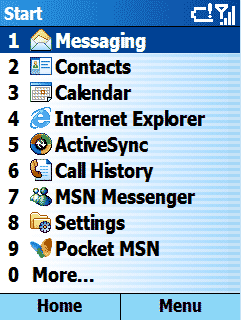
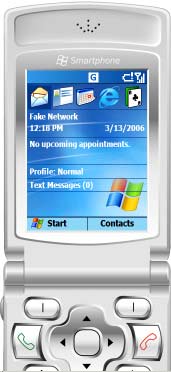
1. Press the [Start] button (Picture1).
2. Select '1 Messaging' option (Picture2).
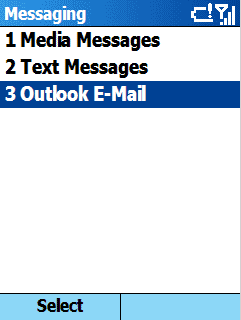
3. Select '3 Outlook E-mail' option
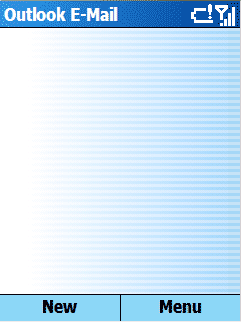
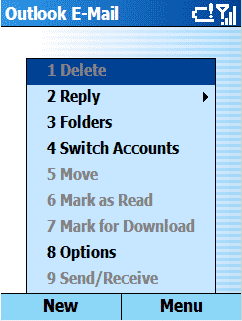
4. Select [Menu]
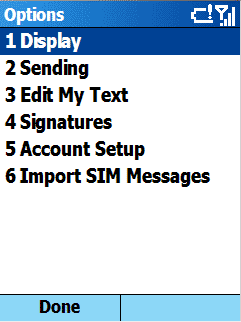
5. Select ' 8 Options' from the 'Menu' list
6. Select '5 Account Setup' from the 'Options' list
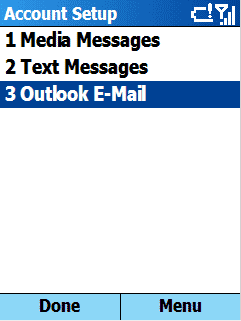
7. Select '3 Outlook Email' from the 'Account Setup' list
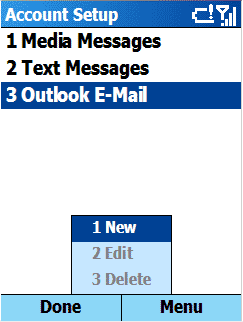
8. Select [Menu]
9. Select '1 New' option from the 'Menu' list
10. Enter your name in the 'Your name' field;
enter your e-mail address in the 'Email Address' field, select [Next] option.
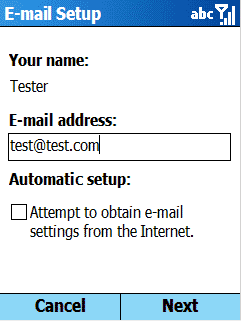
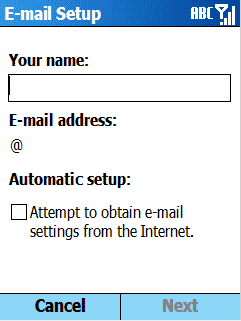
11. Enter your POP3 user name in the 'User Name:' field,
move the cursor below, enter your POP3
account password in the 'Password:' field ,
select whether to save the password or not, and press [Next]
Note: In most cases, the POP3 user name and password are not equal to
the SMTP User Name and SMTP Password.
12. Select 'POP3' as the 'Server type:', move the cursor below,
enter the 'Account name' you want to be displayed in the list of SmartPhone accounts,
move the cursor below and select the type of 'Network' connection from the list of available options (The Internet, MMS Network, Secure WAP Network, WAP Network, Work, etc…).
Make sure that this connection is properly configured in the SmartPhone settings and is available for use, otherwise your e-mail messaging will fail.
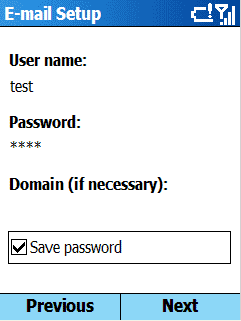
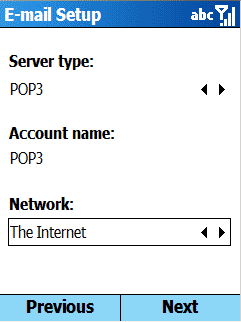
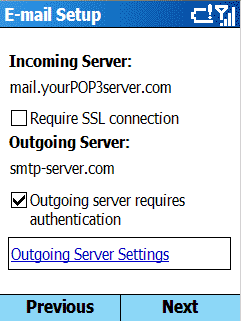
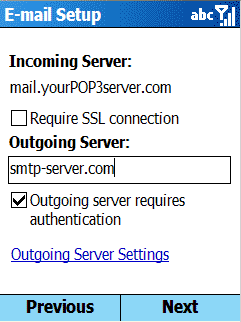
13. Enter your POP3 server name in the ''Incoming Server' field, move the cursor
below and type smtp-server.com in the 'Outgoing Server' field. Check the box 'Outgoing
Server requires authentication'.
14. Select 'Outgoing Server Settings'
For COX in the US here are the POP3 and SMTP server based on your location
POP SERVER FOR COX
In the Incoming mail server (POP3) box and the Outgoing mail server (SMTP) box, type the server names that apply to your geographic location.
East State CT, FL, GA, LA, NC, OH, RI, VA
pop.east.cox.net smtp.east.cox.net
Central State AR, ID, KS, MI, NE, OK, TX, UT
pop.central.cox.net smtp.central.cox.net
West State AZ, CA, NV
pop.west.cox.net smtp.west.cox.net
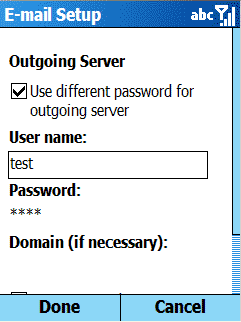
15. If your POP3 account and SMTP accounts have different passwords, check the box ''Use different password for outgoing server'.
16. Move the cursor below and enter your SMTP User Name in the 'User name' field. Move the cursor below and enter your SMTP Password in the 'Password' field.
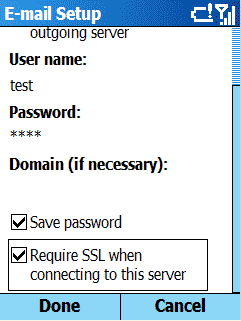
17. Scroll down the screen; check the 'Save Password' and 'Require SSL
when connecting to this server' options. This setting is highly recommended.
It makes your entire email session, including your login, encrypted and secure.
Select [Done] to complete the setup.
18. Select [Next] to configure other e-mail options.
19. Configure other e-mail options and select [Next]
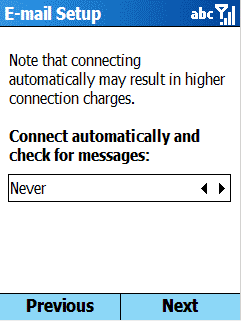
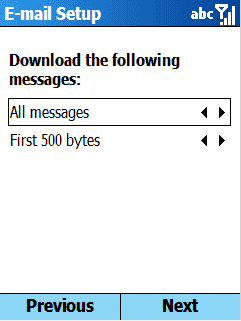
20. Select [Finish] to complete a new e-mail account configuration
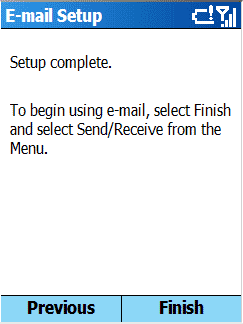
Congratulations! You’ve just completed your POP3 and Secure SMTP account configuration. Now you are ready to send/receive e-mail messages, select 'Send/Receive' from the 'Menu' options to begin using e-mail.
Create an account. You'll then receive details that you'll need to set up your account on your Smartphone. Then, looking at the Smartphone, follow these instructions:
This will work with the motorola Q for example
1. Press the [Start] button (Picture1).
2. Select '1 Messaging' option (Picture2).

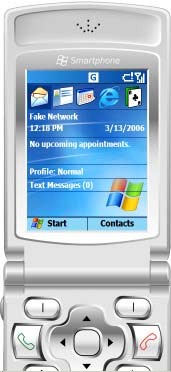
3. Select '3 Outlook E-mail' option

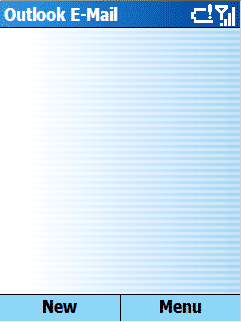
4. Select [Menu]
5. Select ' 8 Options' from the 'Menu' list
6. Select '5 Account Setup' from the 'Options' list
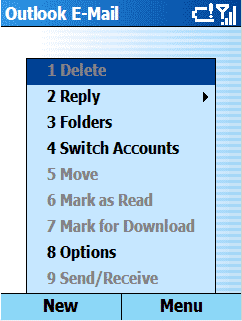

7. Select '3 Outlook Email' from the 'Account Setup' list
8. Select [Menu]
9. Select '1 New' option from the 'Menu' list

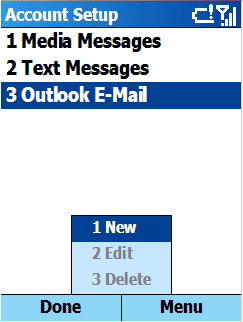
10. Enter your name in the 'Your name' field;
enter your e-mail address in the 'Email Address' field, select [Next] option.


11. Enter your POP3 user name in the 'User Name:' field,
move the cursor below, enter your POP3
account password in the 'Password:' field ,
select whether to save the password or not, and press [Next]
Note: In most cases, the POP3 user name and password are not equal to
the SMTP User Name and SMTP Password.
12. Select 'POP3' as the 'Server type:', move the cursor below,
enter the 'Account name' you want to be displayed in the list of SmartPhone accounts,
move the cursor below and select the type of 'Network' connection from the list of available options (The Internet, MMS Network, Secure WAP Network, WAP Network, Work, etc…).
Make sure that this connection is properly configured in the SmartPhone settings and is available for use, otherwise your e-mail messaging will fail.


13. Enter your POP3 server name in the ''Incoming Server' field, move the cursor
below and type smtp-server.com in the 'Outgoing Server' field. Check the box 'Outgoing
Server requires authentication'.
14. Select 'Outgoing Server Settings'
For COX in the US here are the POP3 and SMTP server based on your location
POP SERVER FOR COX
In the Incoming mail server (POP3) box and the Outgoing mail server (SMTP) box, type the server names that apply to your geographic location.
East State CT, FL, GA, LA, NC, OH, RI, VA
pop.east.cox.net smtp.east.cox.net
Central State AR, ID, KS, MI, NE, OK, TX, UT
pop.central.cox.net smtp.central.cox.net
West State AZ, CA, NV
pop.west.cox.net smtp.west.cox.net
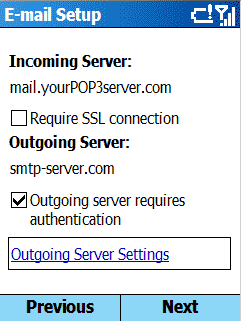

15. If your POP3 account and SMTP accounts have different passwords, check the box ''Use different password for outgoing server'.
16. Move the cursor below and enter your SMTP User Name in the 'User name' field. Move the cursor below and enter your SMTP Password in the 'Password' field.
17. Scroll down the screen; check the 'Save Password' and 'Require SSL
when connecting to this server' options. This setting is highly recommended.
It makes your entire email session, including your login, encrypted and secure.
Select [Done] to complete the setup.

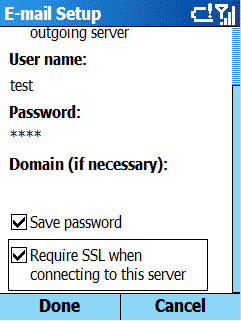
18. Select [Next] to configure other e-mail options.
19. Configure other e-mail options and select [Next]
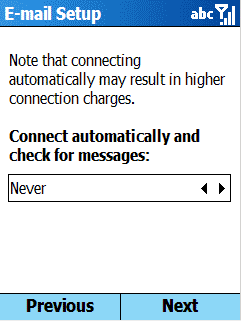
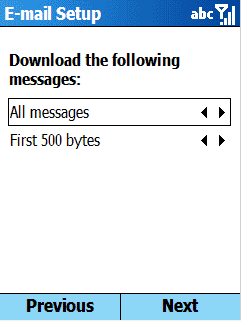
20. Select [Finish] to complete a new e-mail account configuration
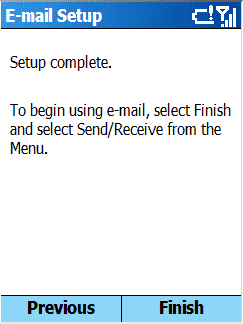
Congratulations! You’ve just completed your POP3 and Secure SMTP account configuration. Now you are ready to send/receive e-mail messages, select 'Send/Receive' from the 'Menu' options to begin using e-mail.
Tuesday, July 11, 2006
My Windows Vista Beta 2 User Experience
What i like
What i don't like
- Search function is nicely integrated in the OS now. Much better than the old search in file Dialog
- File Explorer uses some kind of NextStep functionnality which is great.
- No more Active Sync
- Look and Feel is better
What i don't like
- The windows Paint application still doesn't support Auto Scroll when doing a crop of an image beeing past from a screen shot obviously bigger than the working screen size.
- When i plug some USB devices other than a Smartphone or PDA with a card reader, the color of the icon should change weither the removable storage drive does contain some files or not (empty/full)
to be continued...
Motorola Q and SlingMedia
If you have ever dream of streaming media from your TV to your Q and remote control
your TIVO from your Q when you are out. Check out this video. Sweeeeet
http://www.youtube.com/watch?v=2qCCyGxX5Gk
your TIVO from your Q when you are out. Check out this video. Sweeeeet
http://www.youtube.com/watch?v=2qCCyGxX5Gk
Monday, July 10, 2006
SoundMax Audio Driver Problems on Windows Vista Beta 2
SoundMax Audio Driver Problems
If you are using the onboard Audio card of a Intel Motherboard, then you need to install the SoundMax Audio drivers from Analog Devices. The problem is that the setup kit of the driver checks the windows version and exits with a message that the OS is not supported. There are also some reports of problems with the driver if you go and install via the inf file.
The problem is to get your hands on the lastest drivers. The easiest way was to download it off the Dell support site. Search for "Audio: Analog Devices ADI 198x Integrated Audio, Driver, Windows 2000, Windows XP, Multi Language, Multi System" and download the latest update you can find.
Just have Vista check for new drivers. (Right click on it in the Device Manager, Update Driver Software, Search automatically for updated driver software) Worked for me.
Thursday, July 06, 2006
Treemap
Treemap is a space-constrained visualization of hierarchical structures. It is very effective in showing attributes of leaf nodes using size and color coding. Treemap enables users to compare nodes and sub-trees even at varying depth in the tree, and help them spot patterns and exceptions.Treemap was first designed by Ben Shneiderman during the 1990s. For more information, read the historical summary of treemaps, their growing set of applications, and the many other implementations. Treemaps are a continuing topic of research and application at the HCIL. For more information visit http://www.cs.umd.edu/hcil/treemap/
A very great sample of what you can achieve with tree map
Browse Google News available at the following URL http://www.marumushi.com/apps/newsmap/newsmap.cfm
A very great sample of what you can achieve with tree map
Browse Google News available at the following URL http://www.marumushi.com/apps/newsmap/newsmap.cfm
Hard Drive Browsing
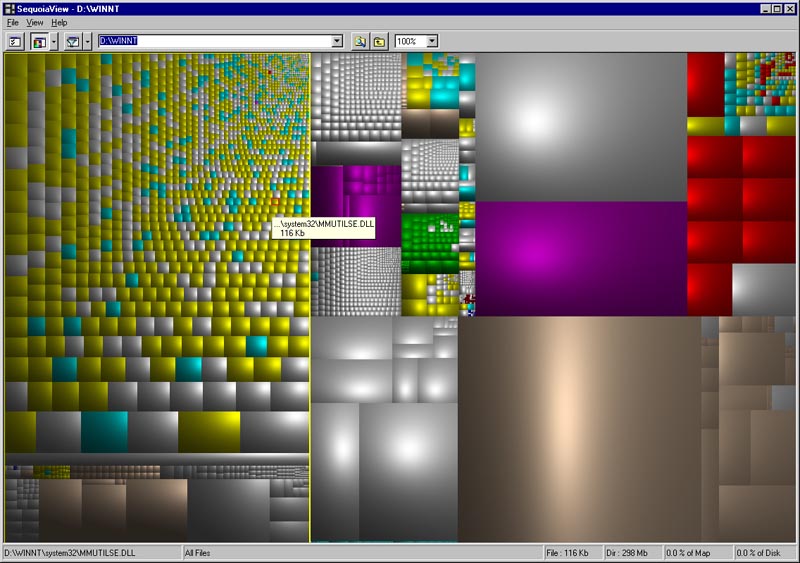
have you ever wanted to delete some files unused from a long time on your harddrive or see right away which use file are taking lots of space on you harddrive. Sometimes this file are deep into a folder hierarchy. Using the build in feature on Windows XP give really really poor features. like cleaning the Temp folder. Watch out this product with a bit of realtime optimization this product will be AWESOME.
Subscribe to:
Posts (Atom)